Making Software: What is a color space?
Source: makingsoftware.com
#colorscience #colorspaces #gamut #oklch
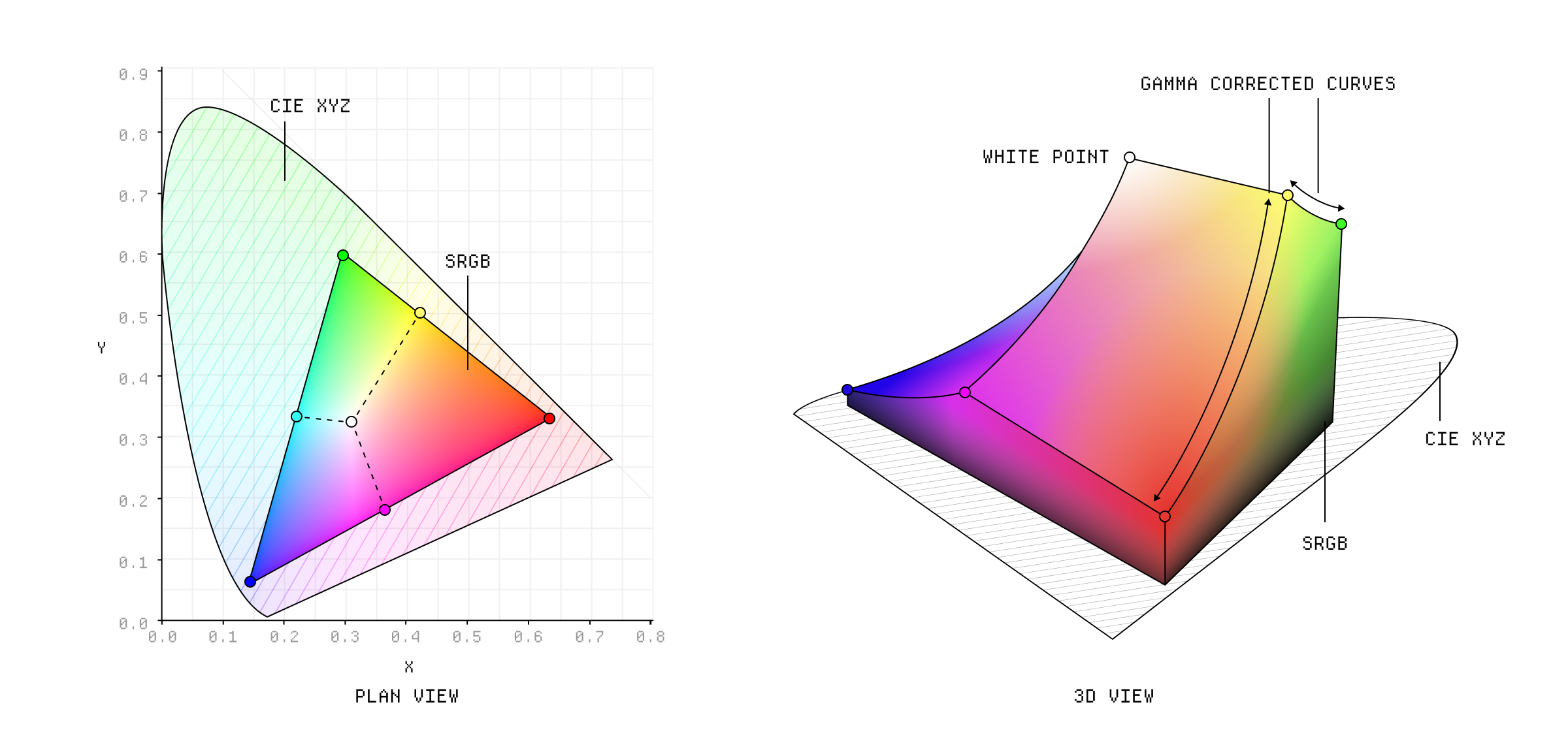
The sRGB color gamut in 3D.
Color is an unreasonably complex topic. Just when you think you've got it figured out, it reveals a whole new layer of complexity that you didn't know existed.
This is partly because it doesn't really exist. Sure, there are different wavelengths of light that our eyes perceive as color, but that doesn't mean that color is actually a property of that light - it's a phenomenon of our perception.
Digital color is about trying to map this complex interplay of light and perception into a format that computers can understand and screens can display. And it's a miracle that any of it works at all.
╌╌╌╌
Light is technically something called electromagnetic radiation and it has a frequency and wavelength. That wavelength can vary, depending on the energy of the wave. High energy waves have a higher frequency and shorter wavelength, and low energy waves have a lower frequency and longer wavelength.
| Type of Radiation | Wavelength Range |
|---|---|
| Gamma Rays | Less than 0.01 nm |
| X-Rays | 0.01 nm to 10 nm |
| Ultraviolet | 10 nm to 400 nm |
| Visible Light | 400 nm to 700 nm |
| Infrared | 700 nm to 1 mm |
| Microwaves | 1 mm to 1 m |
| Radio Waves | 1 m and longer |
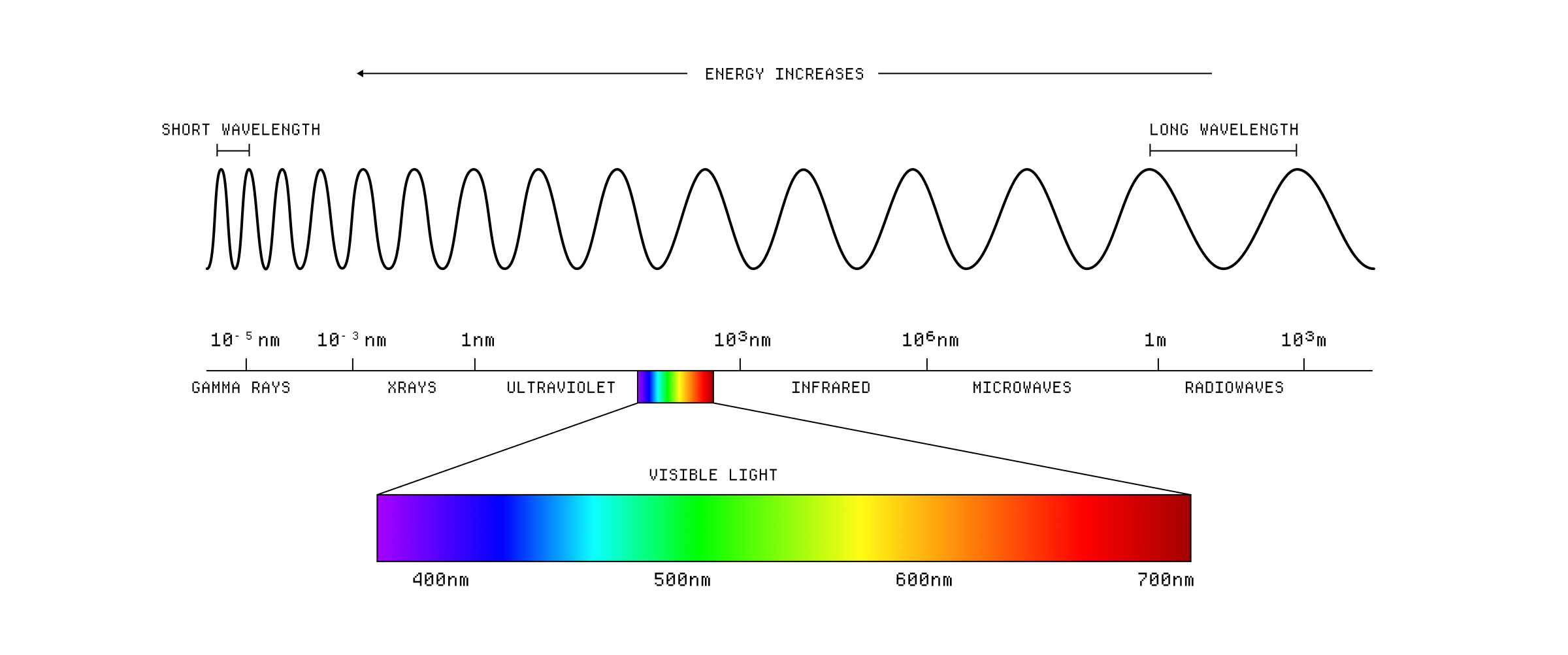
The electromagnetic spectrum.
The sun is constantly bombarding the earth with this electromagnetic radiation, although we only perceive a small fraction of it as visible light. The light from the sun appears white to us but it's actually a mixture of different wavelengths that our brain adds together. Your eye contains two types of photoreceptor cells, rods and cones, which are sensitive to different parts of the spectrum. Rods are sensitive to low light levels and are used for night vision, while cones are sensitive to higher light levels and are used for color vision.
There are three types of cones, each sensitive to different wavelengths of light:
- S-cones (Short-wavelength cones): Peak sensitivity around 420 nm (blue region).
- M-cones (Medium-wavelength cones): Peak sensitivity around 530 nm (green region).
- L-cones (Long-wavelength cones): Peak sensitivity around 560 nm (red region).
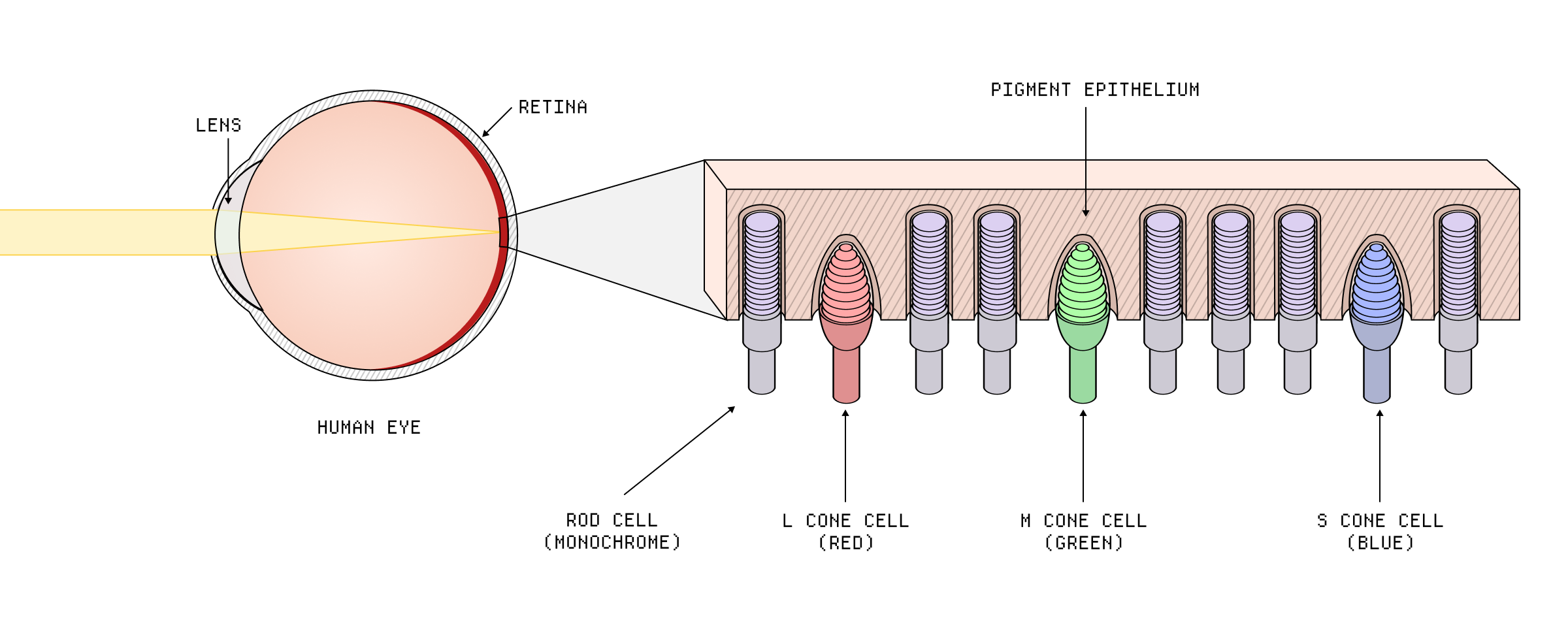
The rods and cones in the eye.
Notice that there are way more rods than cones. This is why we are actually very sensitive to changes in brightness, but not so much to changes in color. The cones are also further from the surface of the retina, which means that more energy is required to stimulate them. Each cone type also has a different response curve:
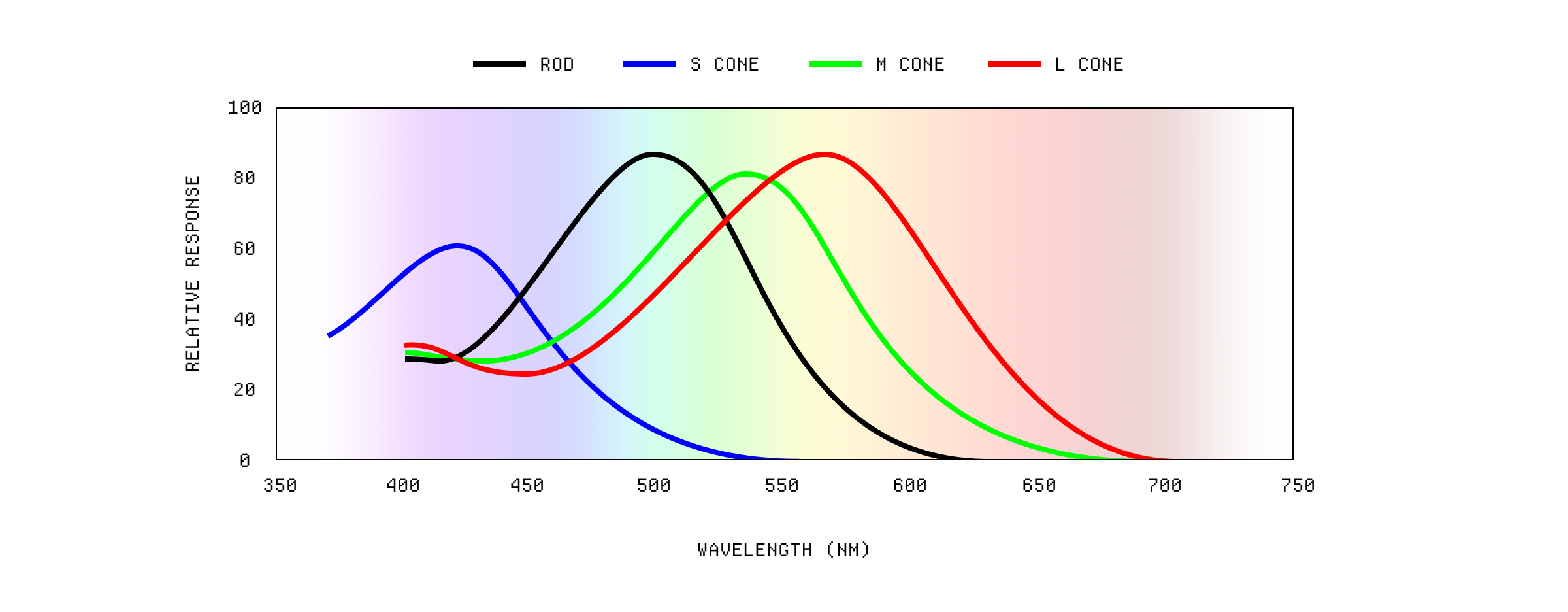
The response of the cones in the eye.
When these cones are stimulated by light, they trigger a series of chemical reactions that send signals to the brain which it then interprets as color. When these wavelengths overlap, two types of cones are stimulated and we perceive an intermediate color, like purple.
The thing that makes this even more complicated is that the human eye is not equally sensitive to all wavelengths of light. The eye is most sensitive to green light, followed by red, and least sensitive to blue.
This means that the same amount of energy at different wavelengths will not be perceived as the same brightness. For example, a light with a wavelength of 555 nm (green) will appear brighter than a light with a wavelength of 450 nm (blue) even if they have the same energy.
There is also a non-linear relationship between the intensity of light and our perception of brightness. This means that a small change in the intensity of light can result in a large change in our perception of brightness, especially at low light levels. You can see this in action in these optical illusions, where the perceived brightness of a color can change based on the surrounding colors.
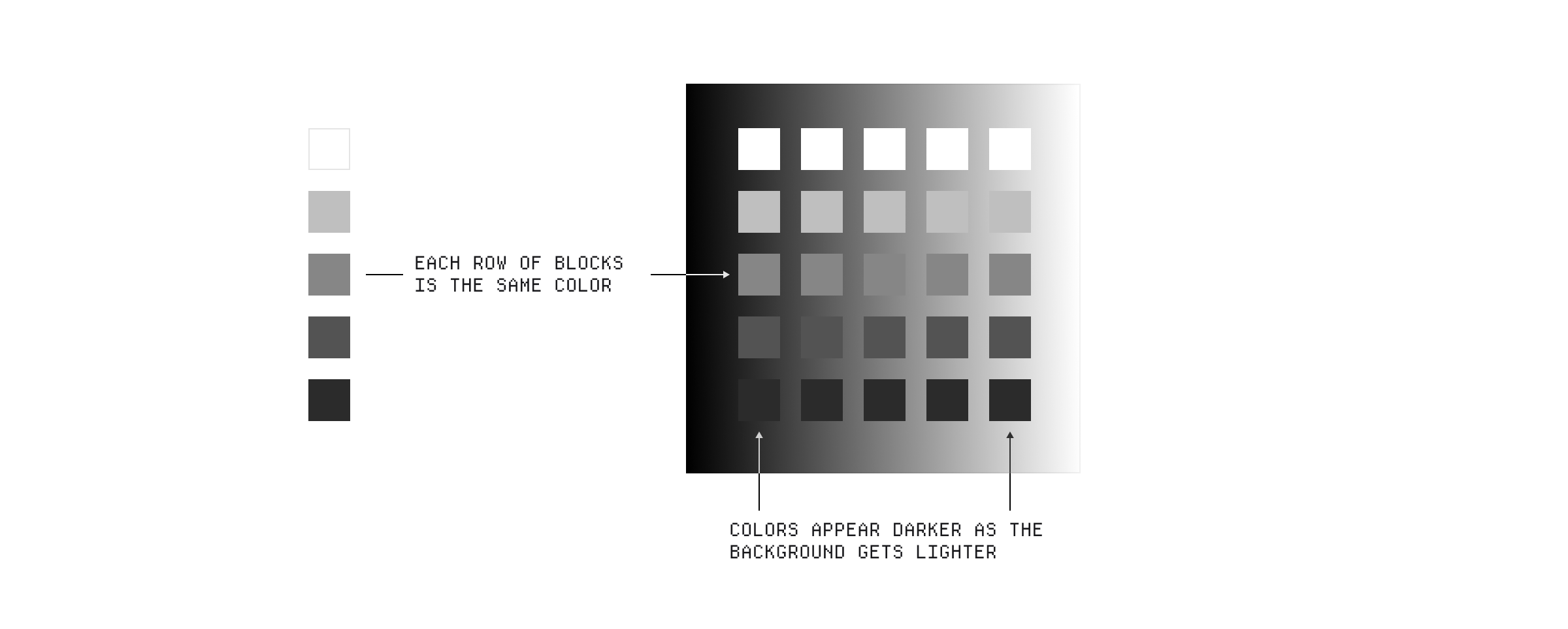
Perceived brightness of a color can change based on the surrounding colors.
Anyway, I think you get the point. Color is complicated, even on the biological level, and so modelling it digitally is an imperfect science.
Once again, we need to go back in time to understand how we got here. In the early days of computing, color was not a priority. Monitors were monochrome and most applications were text-based. The first color displays were developed in the 1970s, but they were expensive and not widely used. It wasn't until the 1980s that color became more common, with the introduction of the IBM PC and the Apple Macintosh.
These early color-capable computers were pretty constrained - memory was scarce and expensive so instead of storing red, green and blue values for each pixel they used a predefined palette of colors. This approach, known as indexed color, stored a small index value (e.g., 1-bit, 2-bit, 4-bit, or 8-bit) for each pixel, which pointed to an entry in a Color Look-Up Table (CLUT) that contained the actual RGB color definitions.
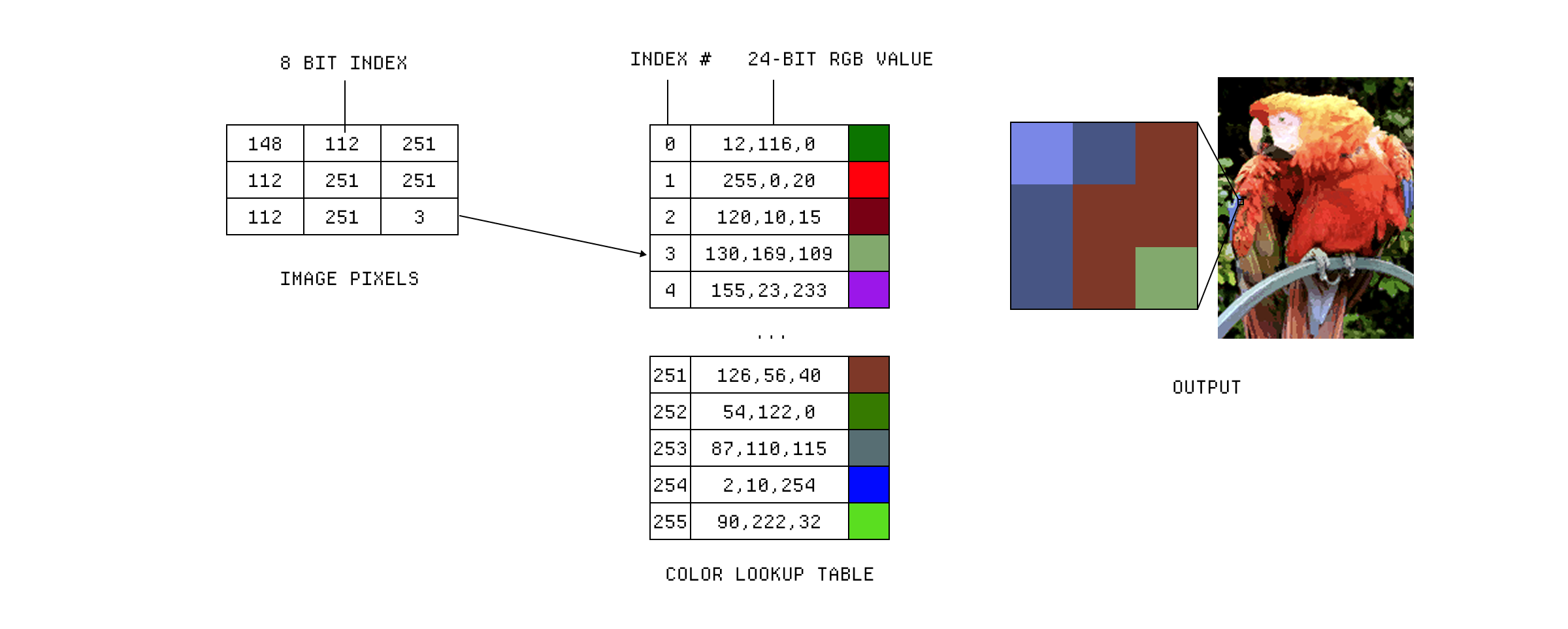
A 256-color palette stored in a Color Look-Up Table.
As hardware caught up, we gradually began being able to store RGB values for each pixel, leading to the development of true color displays that could represent millions of colors.
The problem was, and still is, that devices have different color reproduction capabilities, meaning that the same RGB values won't necessarily look the same on different monitors, printers, or cameras. Some of the larger companies joined together to form the International Color Consortium (ICC) in 1993 to try and standardise color reproduction across devices.
They developed a system of color profiles that could be used to describe the color capabilities of a device, which could then be used to convert colors between different devices. It's used like a sort of mapping between the operating system and the device, allowing the OS to know how to interpret the color values for that device.
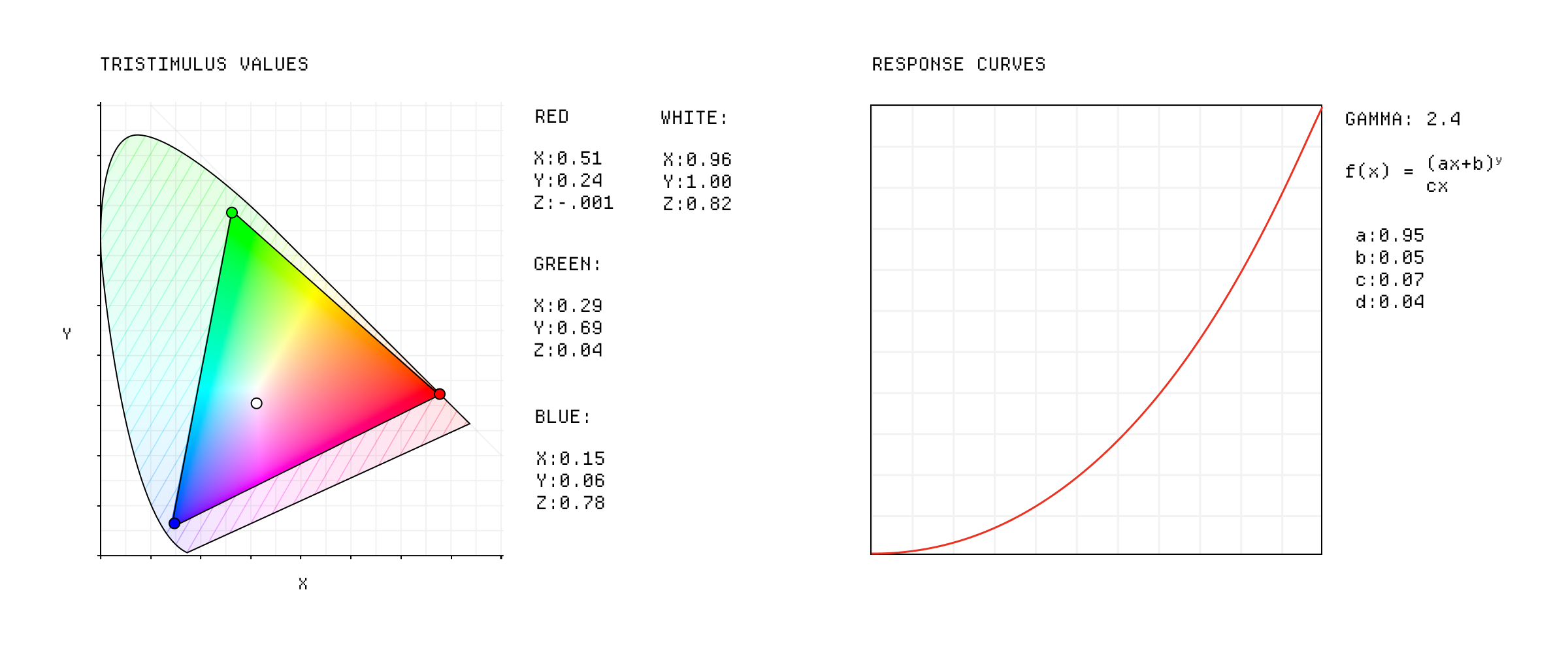
ICC color profile data.
But that's just one part of the puzzle. ICC profiles are used to manage the color reproduction of devices, but they don't define how colors are represented in a digital format and by the time the web came along, we needed a way to represent colors in a consistent way across different devices and applications.
In 1996 Microsoft and Hewlett-Packard banded together to solve this problem by developing a standardised color space for the web and their devices, called sRGB (Standard Red Green Blue).
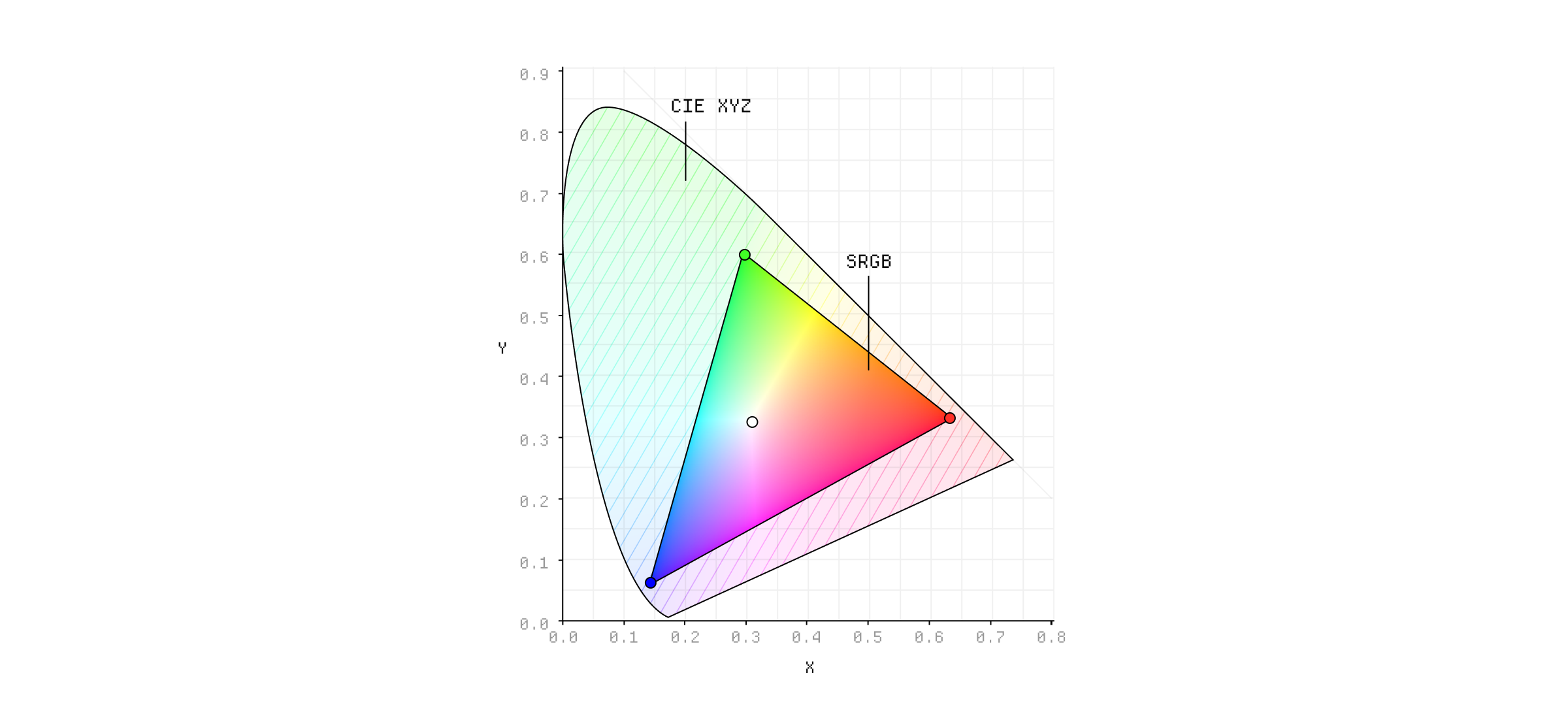
The sRGB color space.
They modelled the color space around the phosphor colors of typical CRT monitors at the time, so that they wouldn't need calibration. Pretty smart honestly.
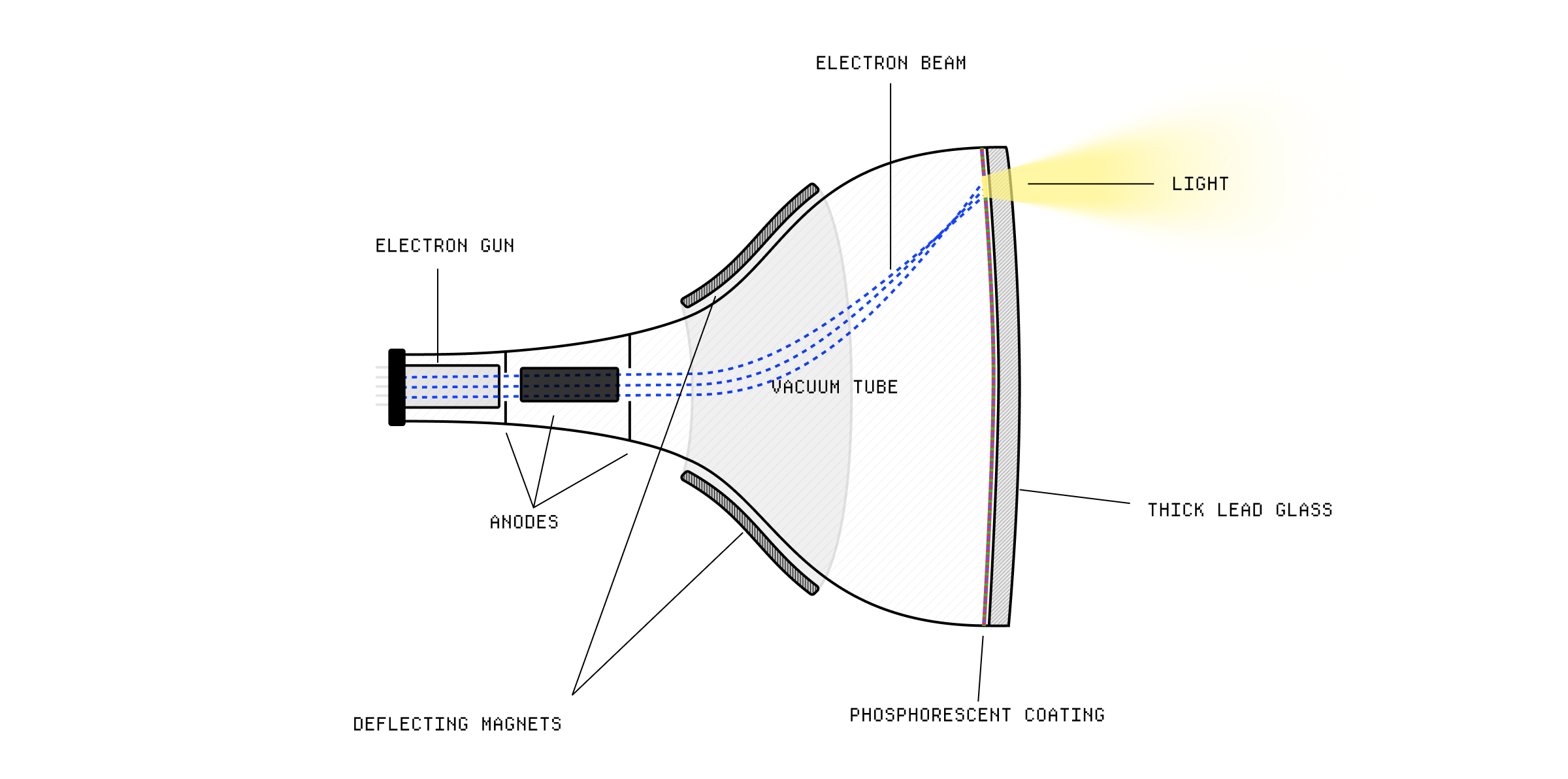
The inner working of a CRT monitor
sRGB has hung around since then, remaining the de facto color space for the web (until recently) and most consumer devices. If your computer is ever unsure about what color space to use, it will default to sRGB. It's also the color space used by most image formats, like JPEG and PNG.
But hardware and software have moved on, and there's a lot of new color spaces that have been developed to take advantage of the increased capabilities of modern displays.
A color space is actually a very abstract concept - it's just a specific organisation of colors so that they are reproducible. Very helpful.
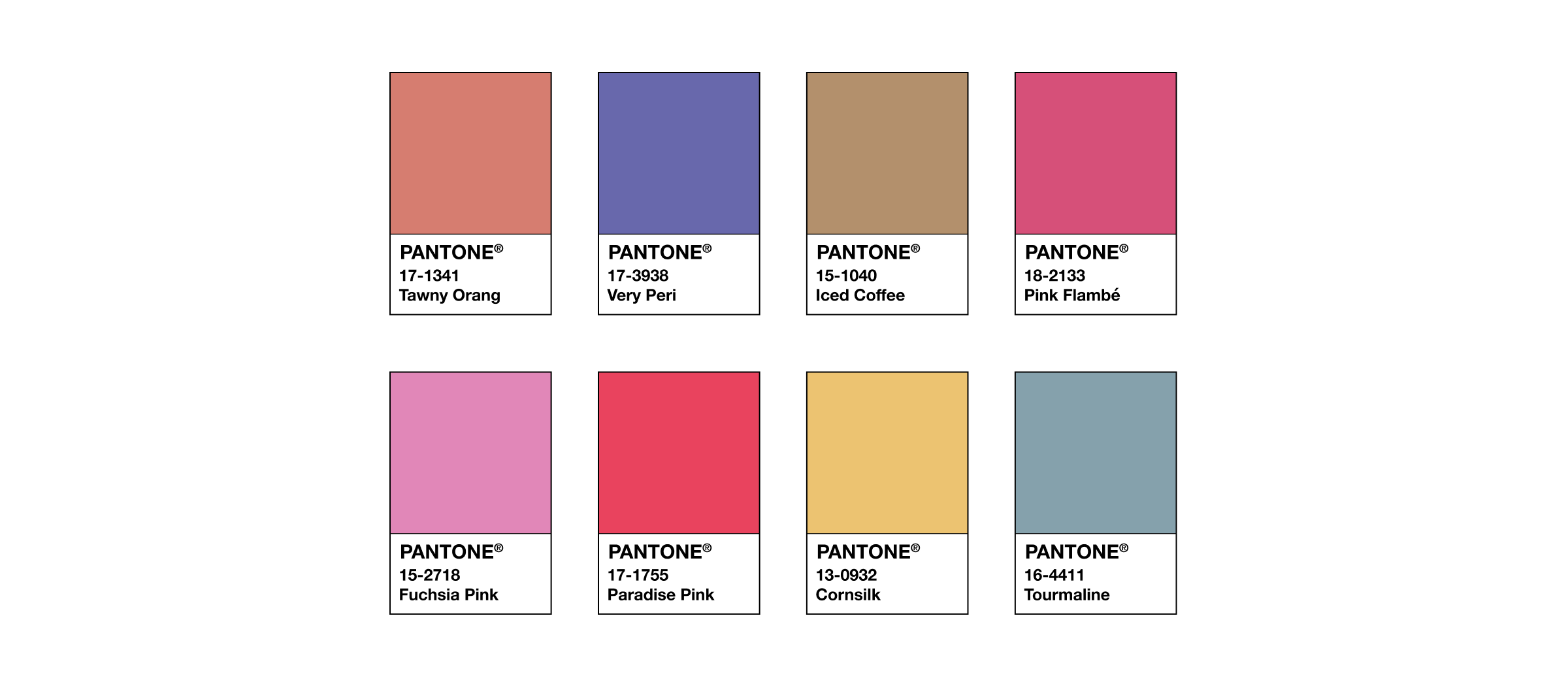
The Pantone color system.
You can think of the Pantone system as a type of color space. On the one side, I have a little booklet with a bunch of colors printed on it. Each color has a unique code and a funny name. On the other side, someone has a manual that tells them the precise recipe for mixing those colors using specific inks. The important thing is that the colors in the booklet and the colors in the manual are defined in a way that they can be reproduced consistently.
In the early 1930s, the CIE (Commission Internationale de l'Éclairage) developed the CIE XYZ color space, which we use as a reference for almost all other color spaces. You can sort of think of this color space as defining the entire range of colors that the human eye can see.
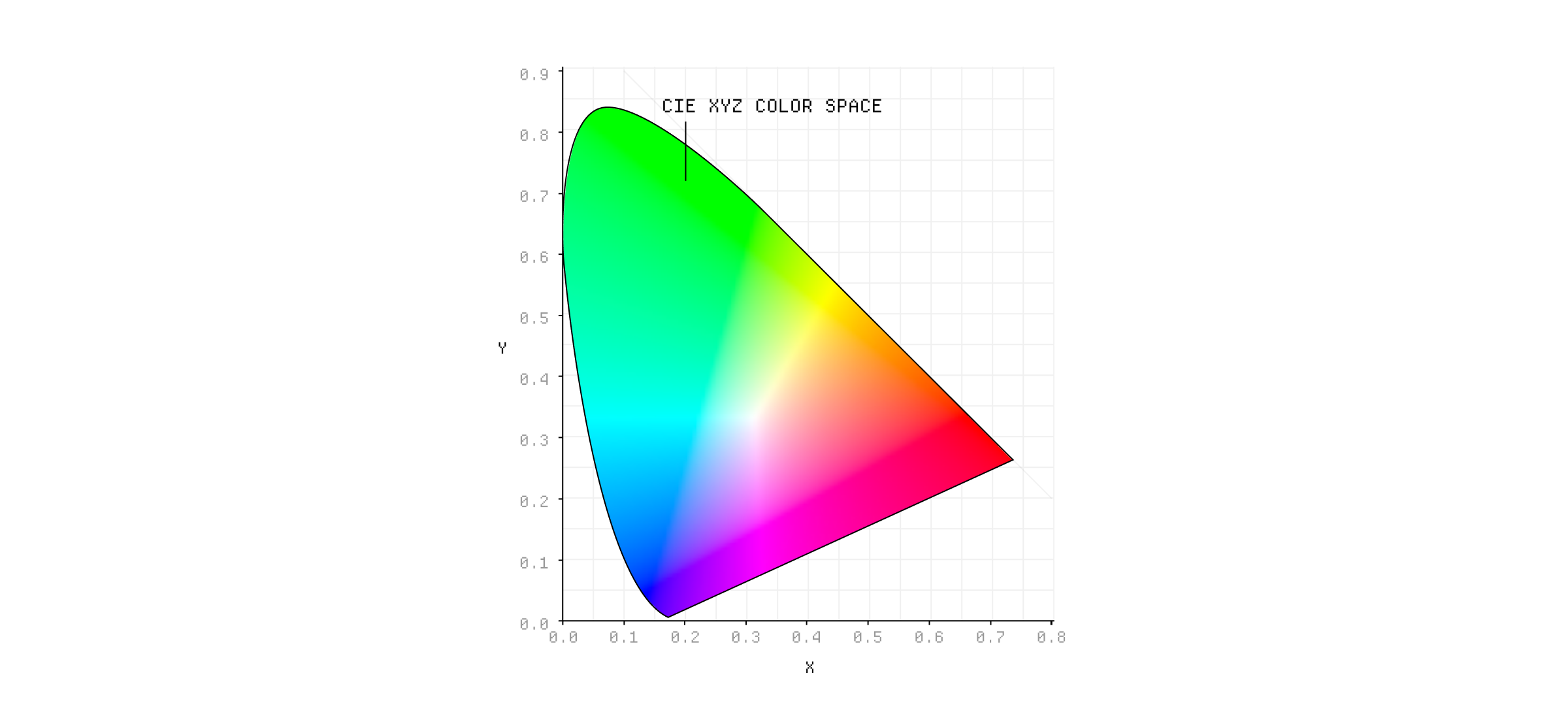
The CIE XYZ color space.
It's device-independent, which means that it can be used to describe colors regardless of the device used to display them. It's not super important to understand what the x, y, and z values represent in the CIE XYZ color space, and honestly, I'd struggle to explain it to you.
Notice how we don't ever specify colors in this format? That's because screens use red, green, and blue sub-pixels to create colors, when we specify color values we actually need to tell the screen how much power to apply to each sub-pixel using RGB values. ⁂
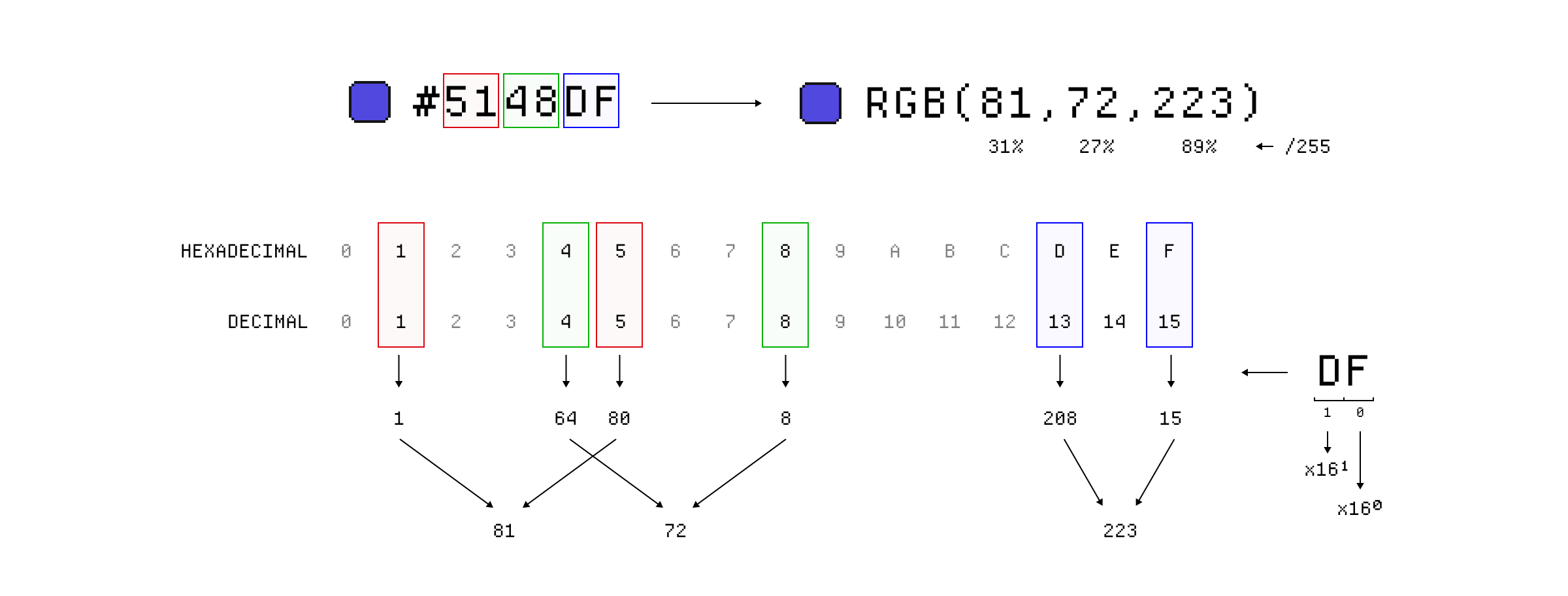
Both hex and rgb values represent a percentage of the maximum value for that channel.
For example, the color white is represented as (255, 255, 255) in sRGB, meaning full intensity of red, green, and blue. In this case we use a value between 0 and 255 because that represents 8-bits (2^8 = 256) per channel but you can think of this as a percentage.
But obviously, our screens are not capable of displaying all the colors in the CIE XYZ color space, which is why we need to create specific colors spaces that are subsets of it. So, how do we go about doing that?
Well, when you make a color space, you define a few things:
- The chromaticities ↓, or coordinates, of the primary colors.
- The coordinates of the white point ↓.
- The gamma ↓ or tone response curve.
To set the chromaticities of the primary colors, you sort of pick their x, y, and z coordinates in the CIE XYZ color space. This gives your color space some limits which will come to define the gamut ↓ of the color space.
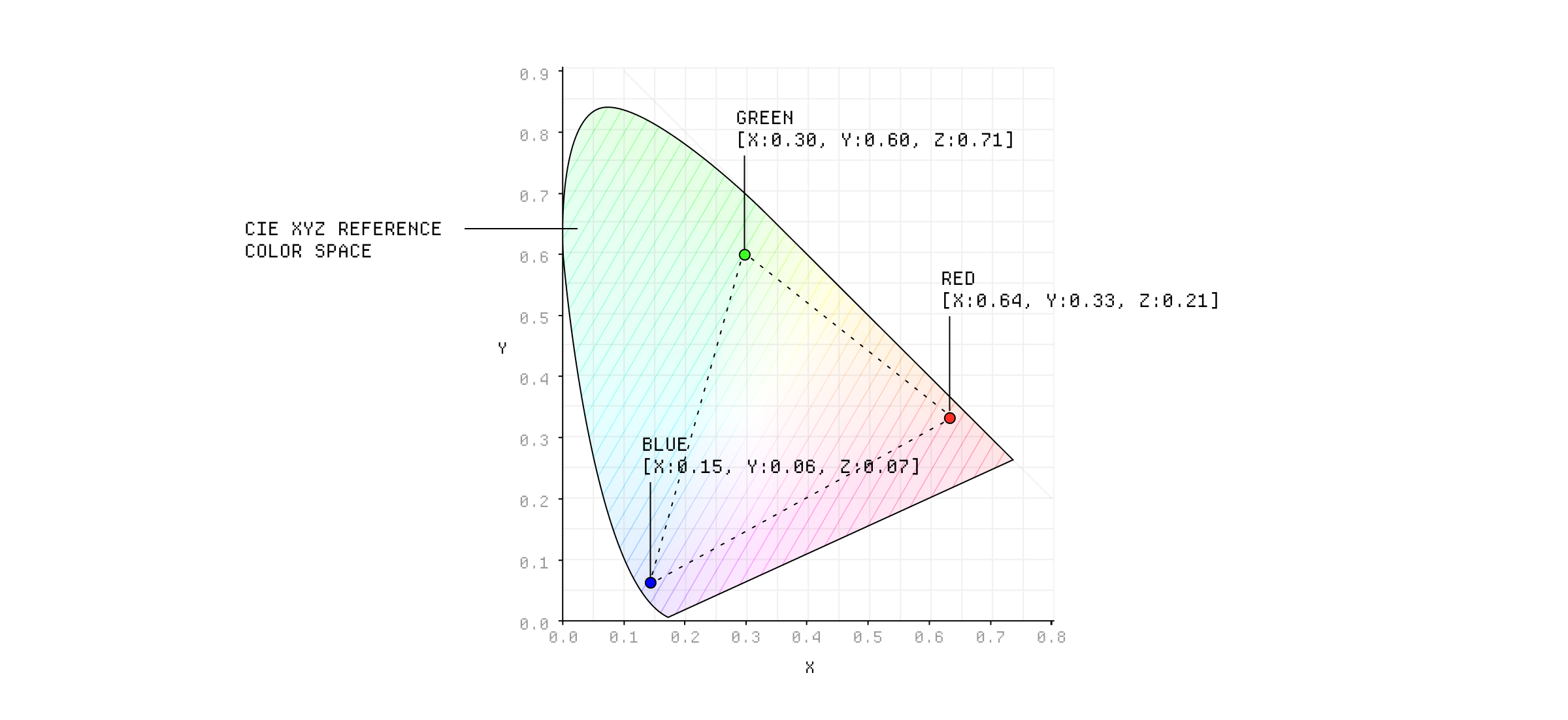
These are actually the chromaticities of the sRGB color space.
These values give meaning to our RGB values. Pure green (0, 255, 0) in our color space now refers to that specific green color defined by the chromaticity values we set. If we had different chromaticities, the RGB values would refer to different colors.
Next, we need to set the coordinates for the color we want to use as the white point, which helps us to define the color temperature of the color space. Pure white is actually unrealistic to use so we want to pick a white that mimics typical daylight or interior lighting. The white point is important because it affects how we perceive all other colors.
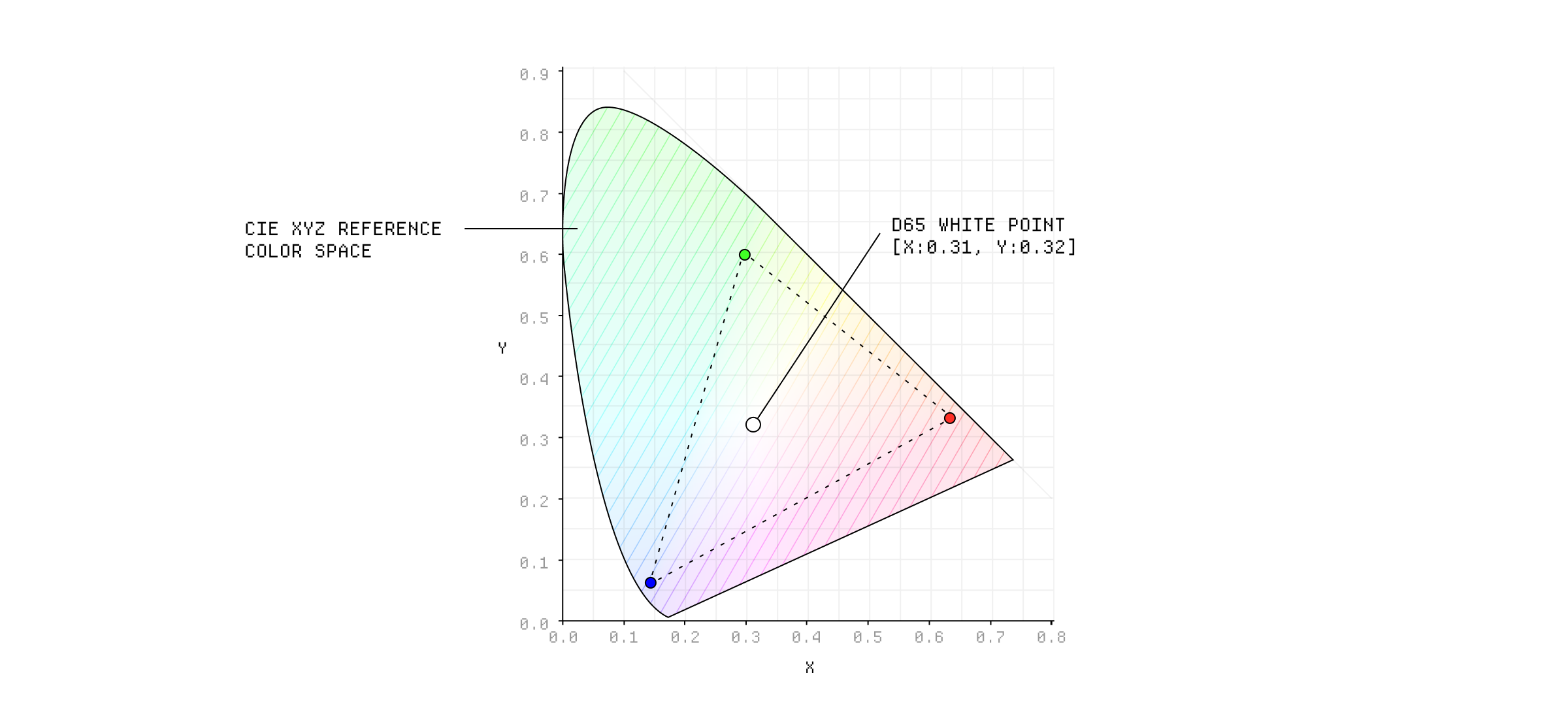
The D65 white point is one of the most common for digital color spaces.
Finally, we define the gamma or tone response curve. You can kind of think of this like an easing curve we apply, that adjusts the brightness of the colors to make the progression seem more natural. This is important because our eyes perceive brightness in a non-linear way, so we need to adjust the colors to match our perception.
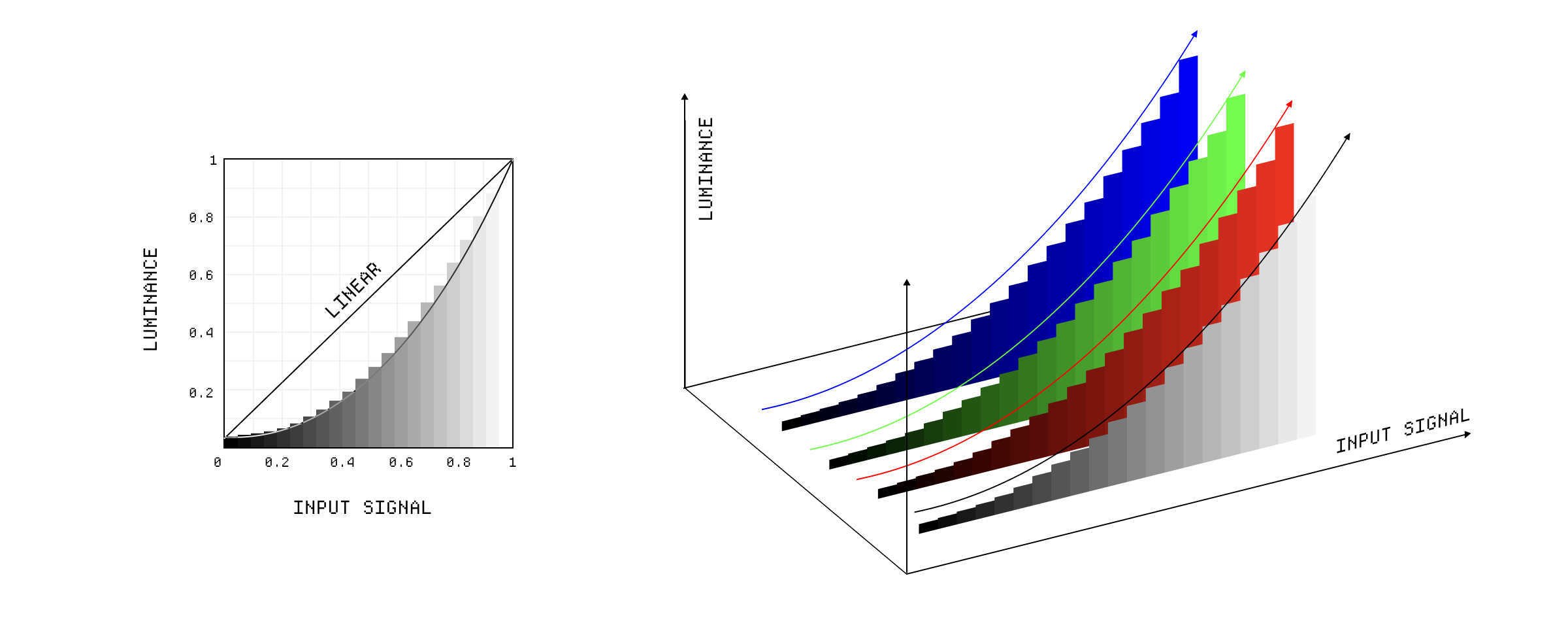
The gamma correction curve.
So why do we have so many different color spaces? Well, over time, screen technology has improved and modern displays can reproduce a wider range of colors accurately. So we created new color spaces to take advantage of that.
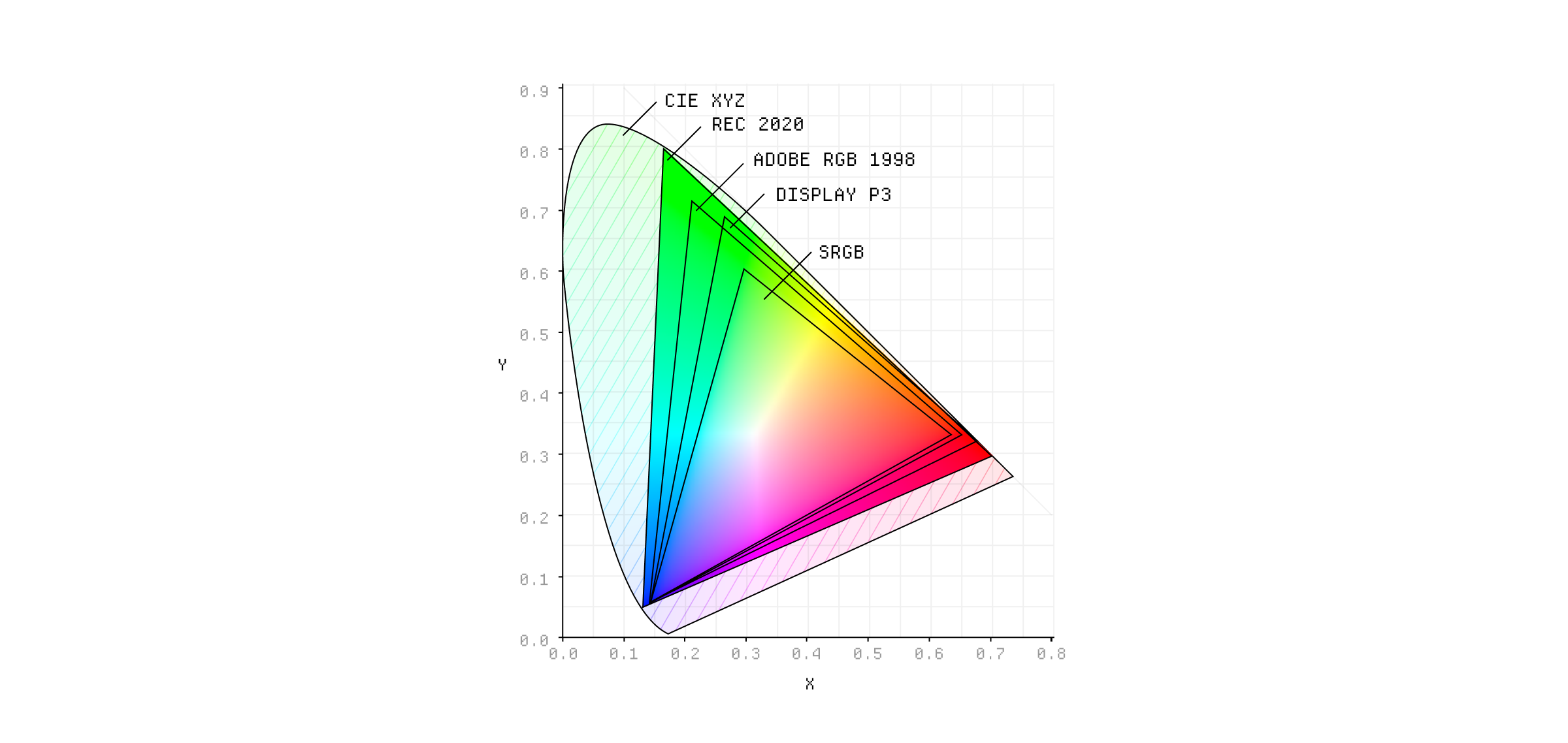
Some popular color spaces and their gamuts.
Different industries and applications also have different requirements for color reproduction. For example, the film industry uses the DCI-P3 color space, but for digital application we use Display P3, which is a slightly different version of it. They have the same gamut but different white points and gammas, with DCI-P3 using a warmer white point to match the characteristics of digital cinema projectors.
Applications like Photoshop can use wider gamut spaces than your screen can actually handle, like ProPhoto RGB, which allows you to work with a wider range of colors and then convert them to a smaller gamut color space when you're ready to export. Working in these wide gamut, high-bit-depth color spaces allows them to maintain precision when doing complex color calculations.
A gamut is the specific set of colors that are reproducible in a given color space, or by a specific device. Again, the limits of the gamut are defined by the primary colors and the white point. We can visualise this by plotting it against the CIE XYZ color space, adding some points for the primaries and white point, and then joining them with some lines.
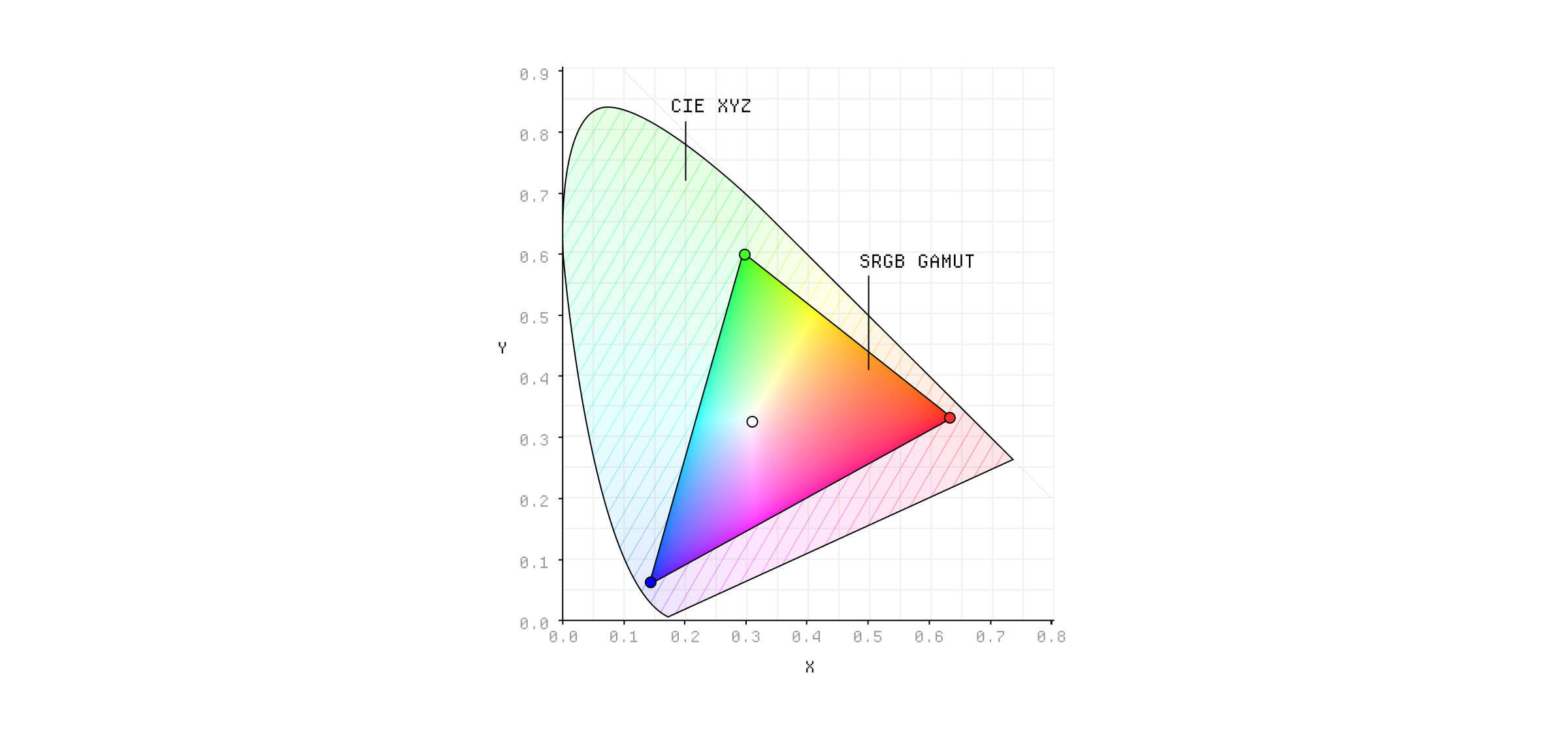
The sRGB color gamut.
This shape represents the gamut of the color space - anything within this is reproducible in this color space and anything outside of it isn't. Put simply, the farther apart the primaries are, the larger the gamut. Here are the different gamuts of some common color spaces:⁂
The relative sizes of different color gamuts.
Visualising a gamut in 2D like this is a bit misleading because it doesn't really show the full range of colors. It's just a 2D projection of a 3D shape, which is why we can also visualise the gamut in 3D:
The sRGB color gamut in 3D.
In 3D a few things are more obvious. For instance, you can start to understand how the primaries and white point define the shape and volume of the gamut. You can see the difference in brightness between the primaries, with green being the brightest by far. And you can also notice the curved edges of the gamut, which is a result of gamma correction.
Display P3 has a roughly 25% larger gamut than sRGB, mainly because the red and green primaries are farther apart. In 2D the size difference isn't that obvious, but in 3D you can see where the extra volume is added.
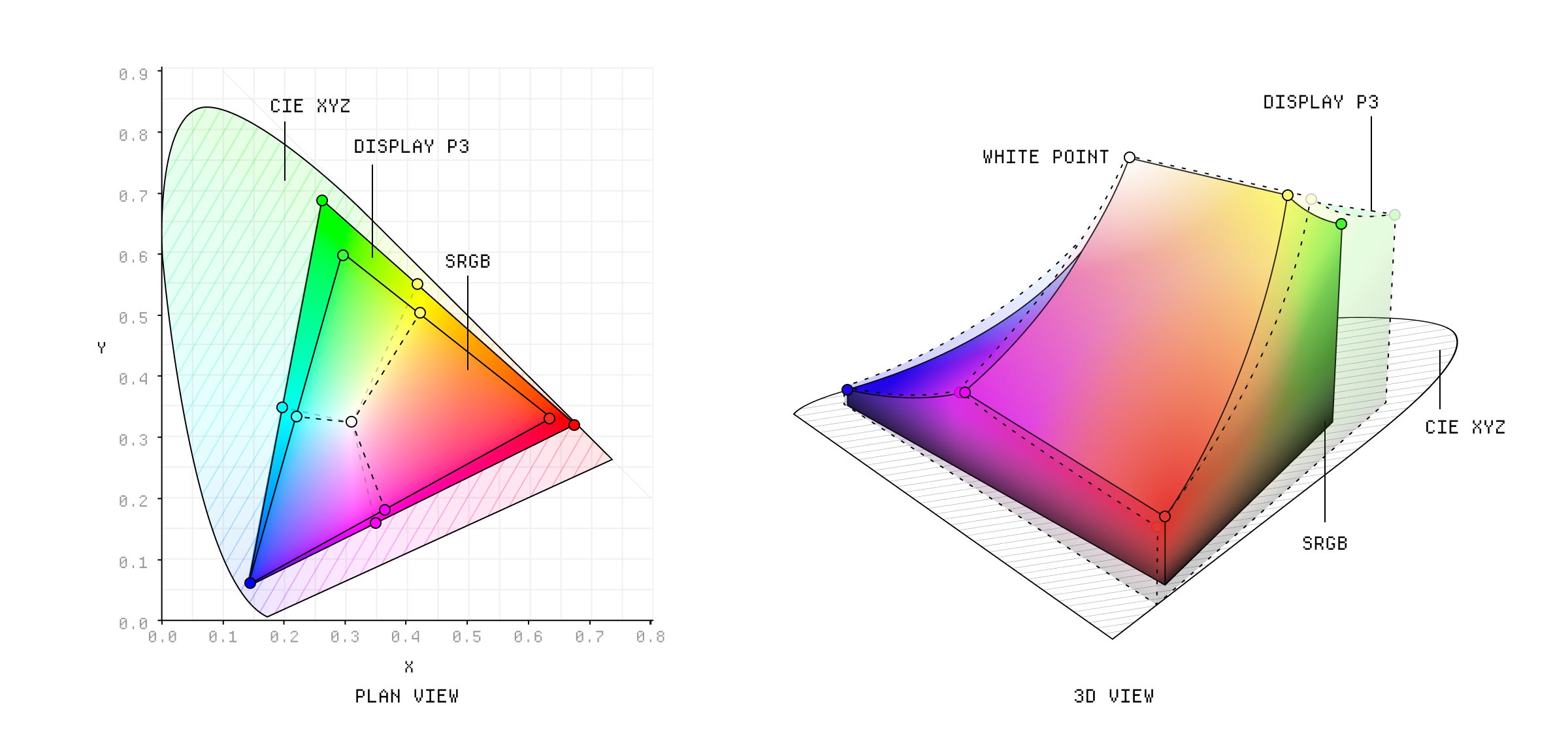
The sRGB and Display P3 color gamuts in 3D.
Some color spaces, like oklab, have gamuts that match the CIE XYZ color space, which means they can represent all colors that the human eye can see. These are usually known as device-independent color spaces because they are not tied to any specific device or display technology.
We can still use these color spaces, we just need to clamp the colors to the gamut of the device we are using. So you can use the oklab, or oklch, color spaces but keep their values within the Display P3 gamut to make sure people can actually see the colors on their screens.
The number of colors in a gamut is actually a function of the bit depth ↓ of the color space. For instance, sRGB has 256 possible values per channel, which means it can represent 16.7 million colors (256^3 = 16,777,216). If you increase the bit depth to 10 bits per channel, you can represent over a billion colors (1024^3 = 1,073,741,824).
We can arrange the gamut of a color space in any way we want. When we specify the colors in the RGB format, we are implying that the colors are arranged in a cube, where the red, green, and blue values are the x, y, and z coordinates respectively.
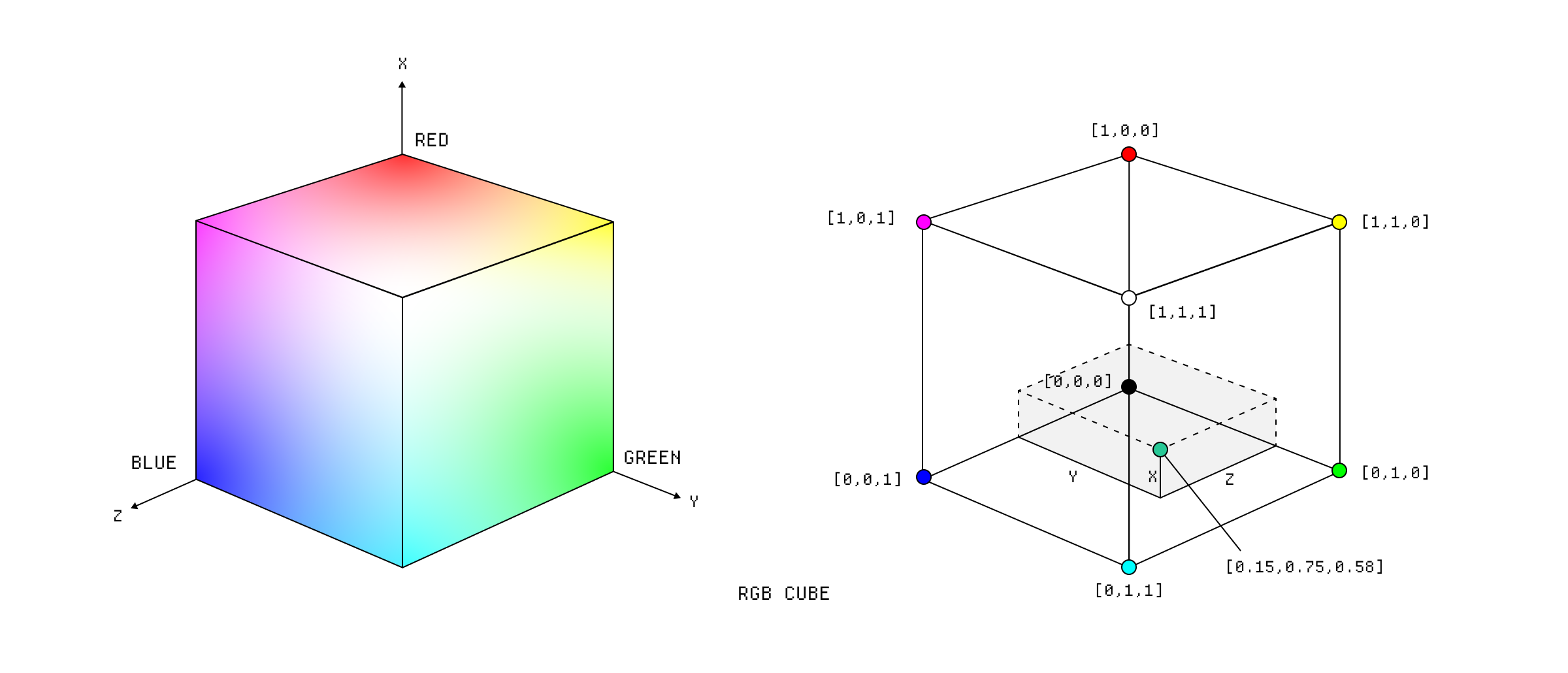
The RGB color model.
This is called a color model and I think a lot people conflate this concept with the color space itself. The primaries and the white point haven't changed, and therefore neither has the gamut. Instead it's just a different geometric arrangement of the colors. We can arrange the same set of colors in a cylinder if we want.
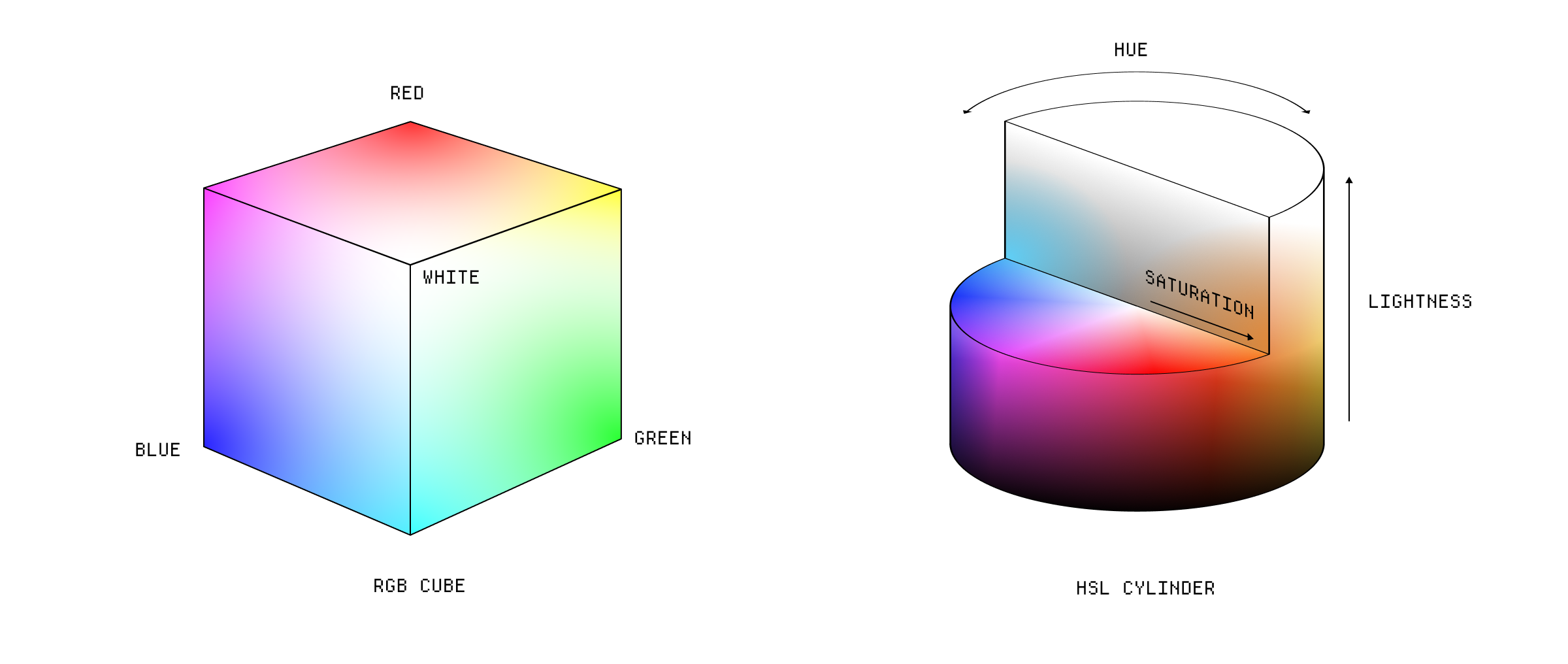
The RGB and HSL color models.
This is the HSL cylinder and it allows us to specify the component values in a more human readable format - instead of red, green, and blue we can specify the hue, saturation and lightness values. The hue is specified as the degrees of a circle and we can change that value while holding the other two constant.
There's another variation of this called HSV, which is similar to HSL but uses value ↓ instead of lightness ↓. It's a confusing difference, but you can see that the top of the cylinder is white in HSL, while the top of the cylinder is the maximum brightness for that color in HSV.
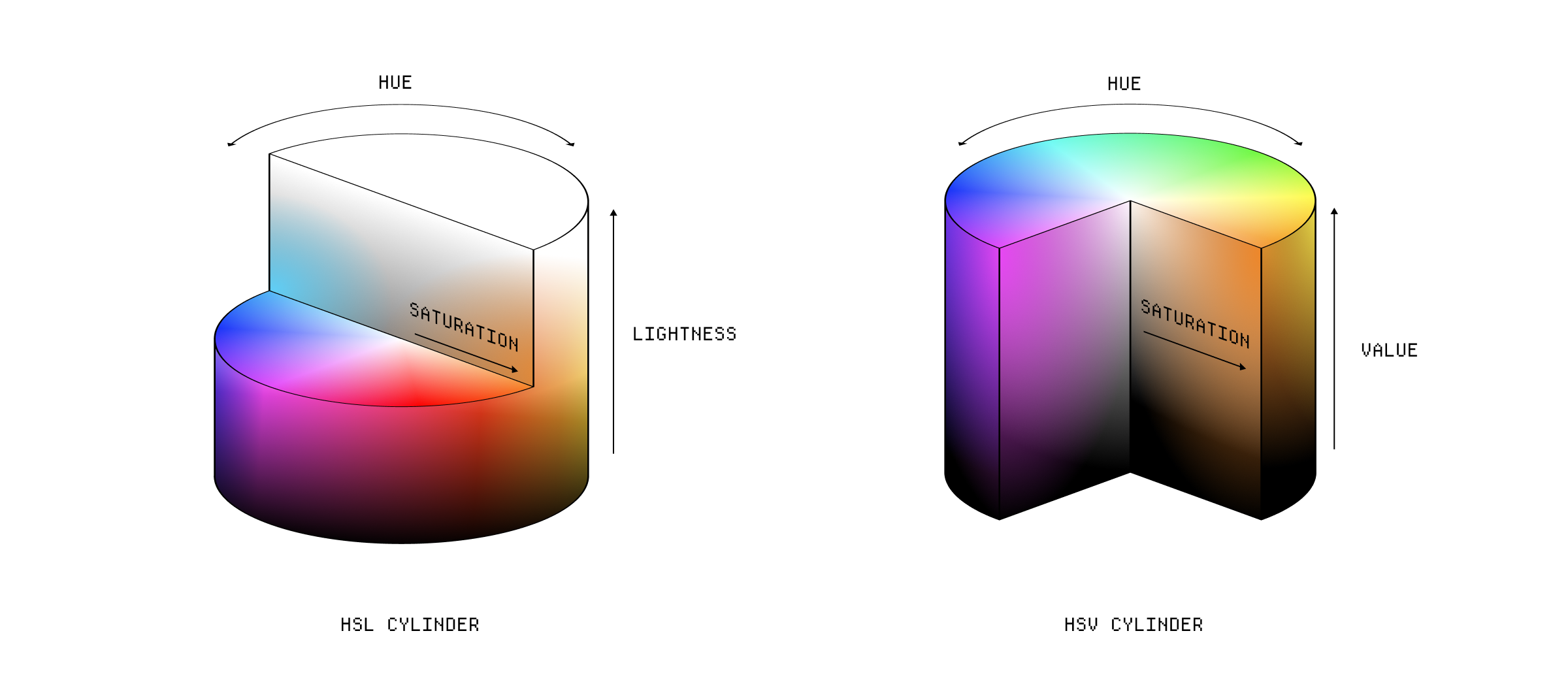
The difference between HSV and HSL.
These are called polar color models because they use polar coordinates to specify the colors, wheras RGB is a Cartesian color model because it uses Cartesian coordinates.
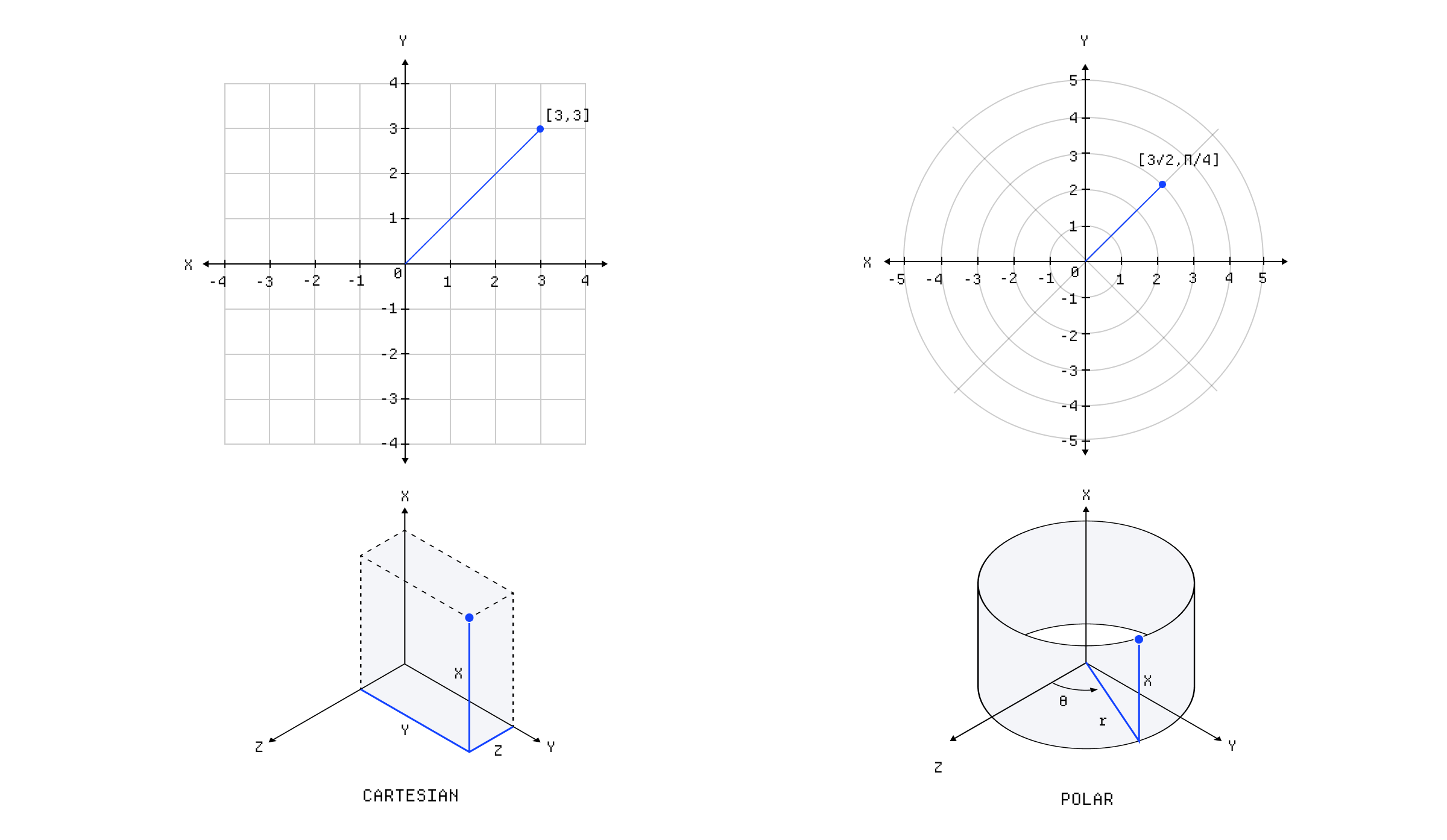
The difference between polar and Cartesian coordinates.
Converting between most color models is surprisingly simple, and it's usually just a case of doing some geometry using the vertices of the models. For instance, here's how you convert from RGB to HSL:
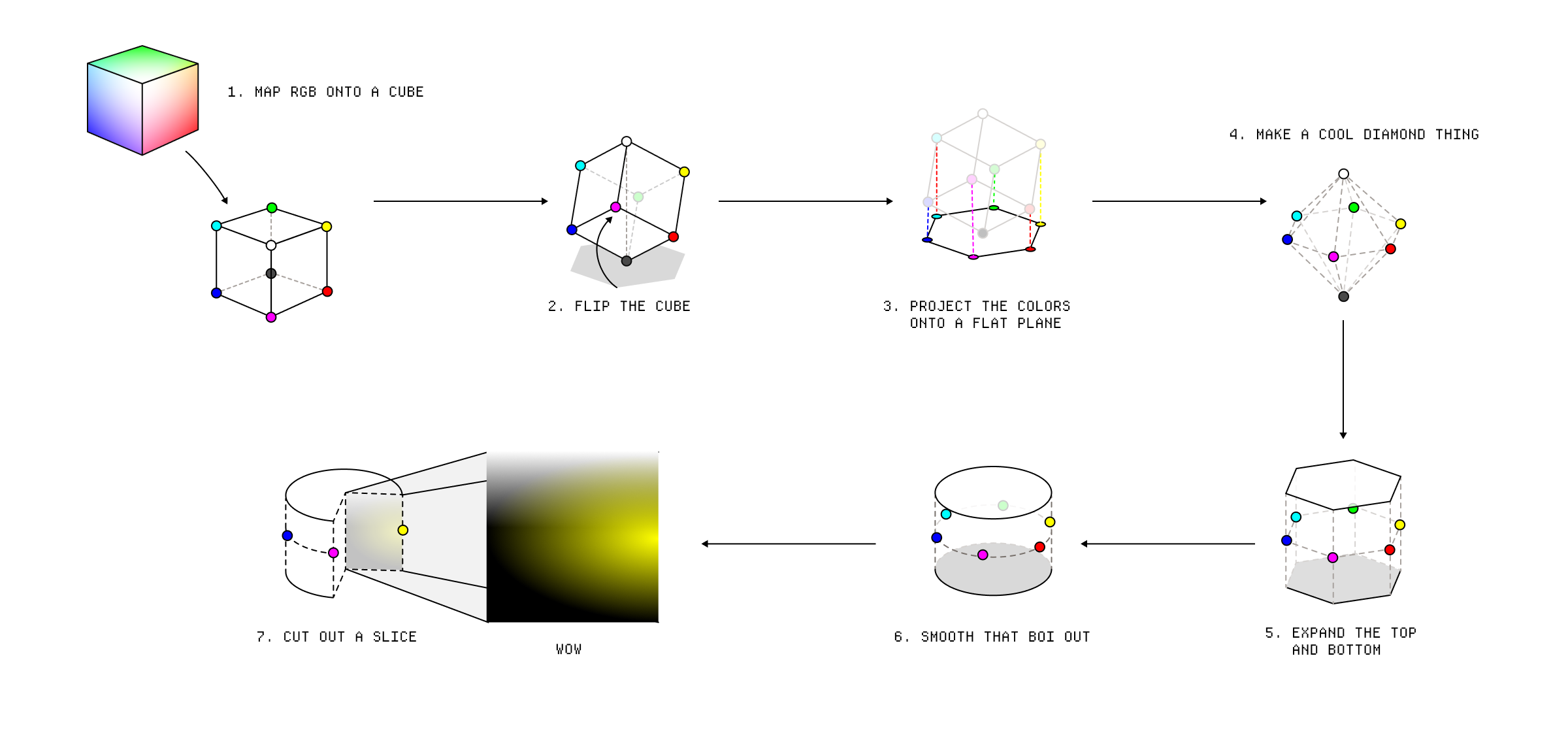
A diagram showing how to convert RGB to HSL.
We can use even more complex color models to create perceptually uniform color spaces ↓, like oklch, where we manipulate the distances between colors to try and compensate for the quirks of human perception.
The way colors are arranged in a color space is important for determining gradients. When you change color model, you change the distance between any two colors and the colors that fall between them.
To create a gradient, you find the coordinates of the two colors and you interpolate between them. It's tempting to think of this as drawing a straight line between the two colors but it actually depends on the interpolation method. In an RGB cube, we can just linearly interpolate between the two colors but when they are on opposing sides of the cube, it tends to pass through the de-saturated middle.
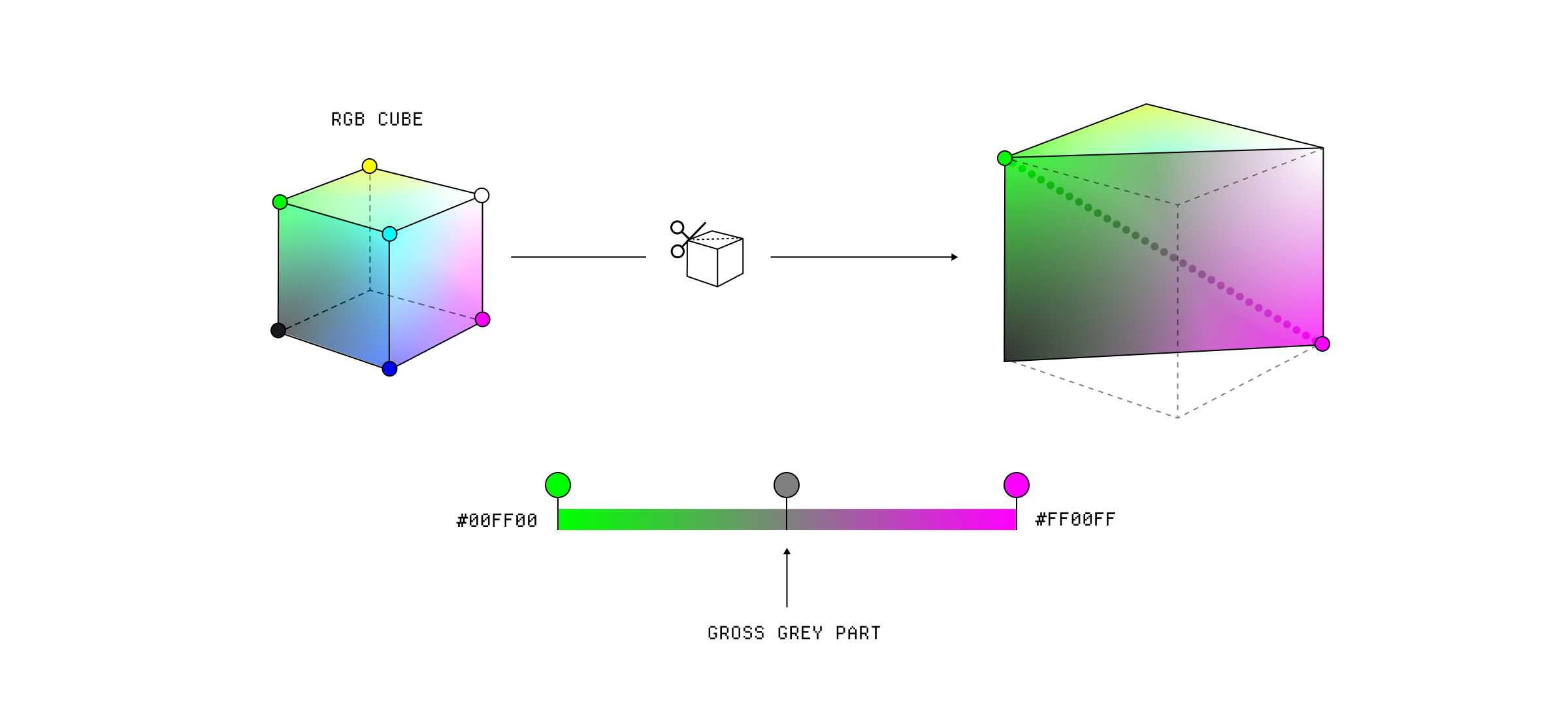
Linear interpolation in RGB.
If we interpolate in an HCL cylinder, we can do some fancier things, like interpolating the hue separately from the lightness and saturation allowing us to take a trip through different hues.
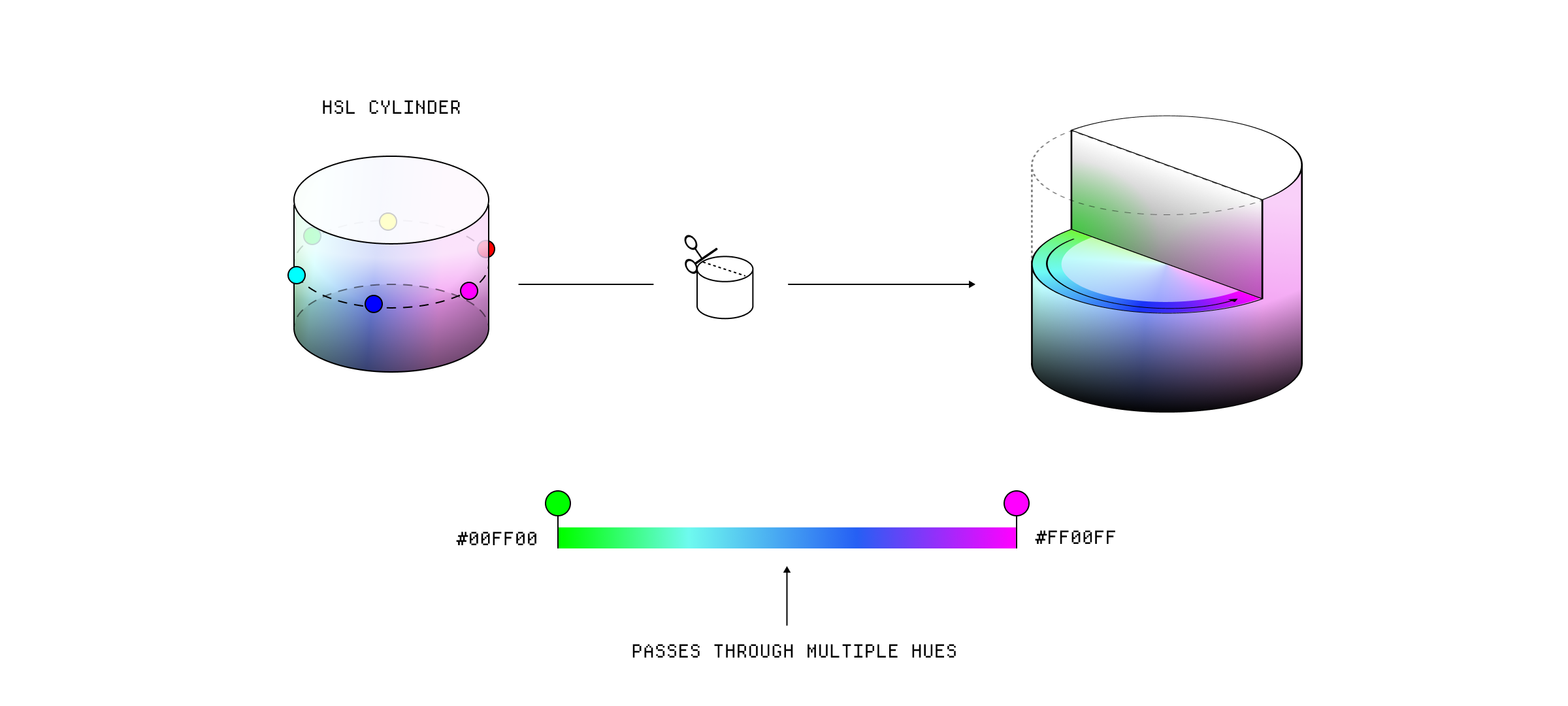
Polar interpolation in HSL.
The interpolation method isn't necessarily constrained by the color model because we can convert the colors to another color model, do the interpolation, and convert all the values back to the original color model. ⁂
In fact, you can create custom interpolation methods to create specific effects. These sorts of gradients are used quite a lot in data visualisation, where you want to create a palette with high degrees of contrast. Here's one using a Cube Helix gradient:
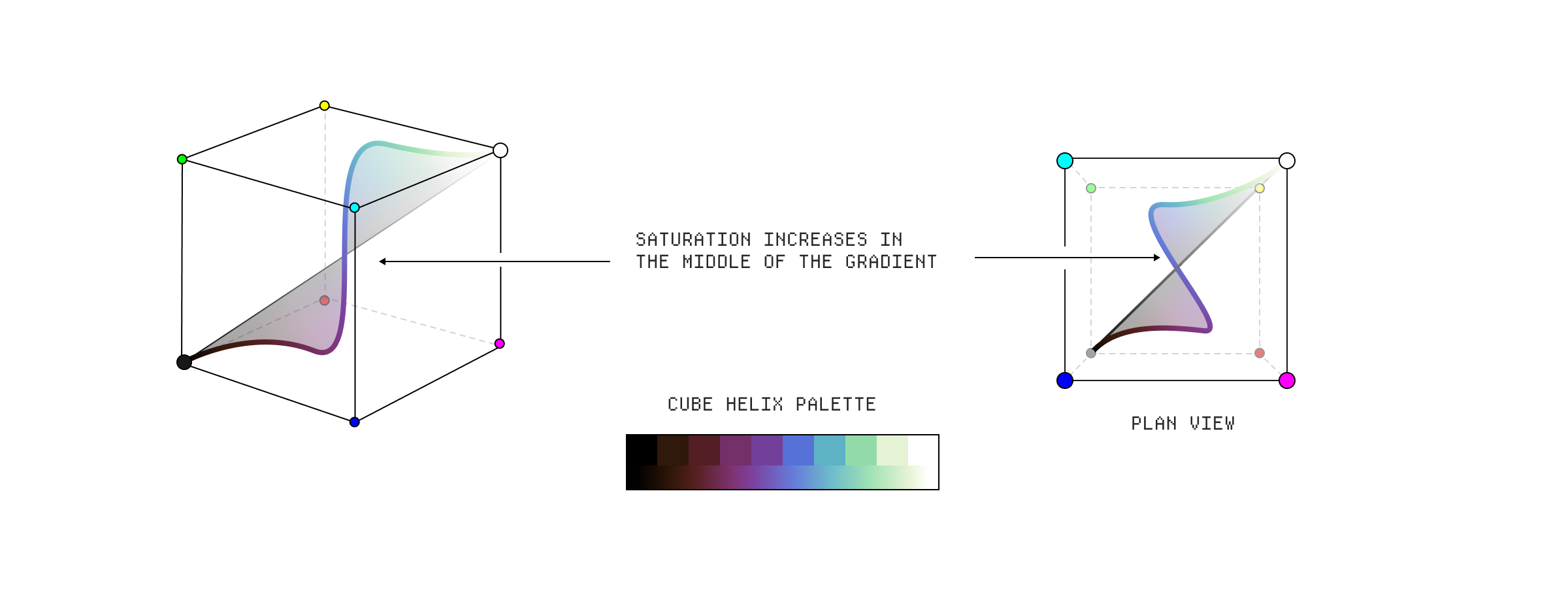
A Cube Helix gradient.
Humans don't perceive color in a uniform or linear way, which is really annoying. For instance we don't have a linear perception of brightness, which means we perceive higher contrast between dimmer colors than brighter colors, even if both sets of colors have the same mathematical distance between each other.
An optical illusion showing that we perceive brightness in a non-linear way.
We also have a difference in our sensitivity to different colors - for instance our sensitivity to hue and saturation depends on the color's brightness. We are less sensitive to changes in hue in very bright colors, which you can see with green, but we are more sensitive to changes in saturation in bright colors. (Apologies to your retinas for the image below)
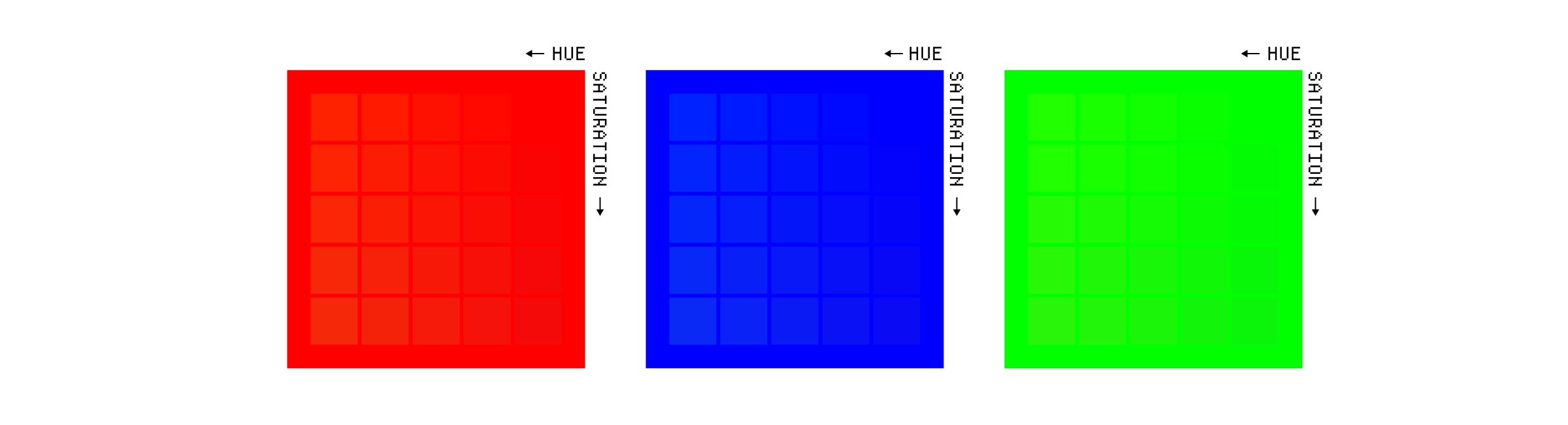
Hue and saturation differences.
All of these quirks make it difficult to create color spaces that accurately model human perception. The first real attempt to design a perceptually uniform color space came in the 70's when the CIE developed the CIE LAB color space. It uses the LAB color model, which splits a color into lightness (L), it's red to green value (a), and it's yellow to blue value (b).
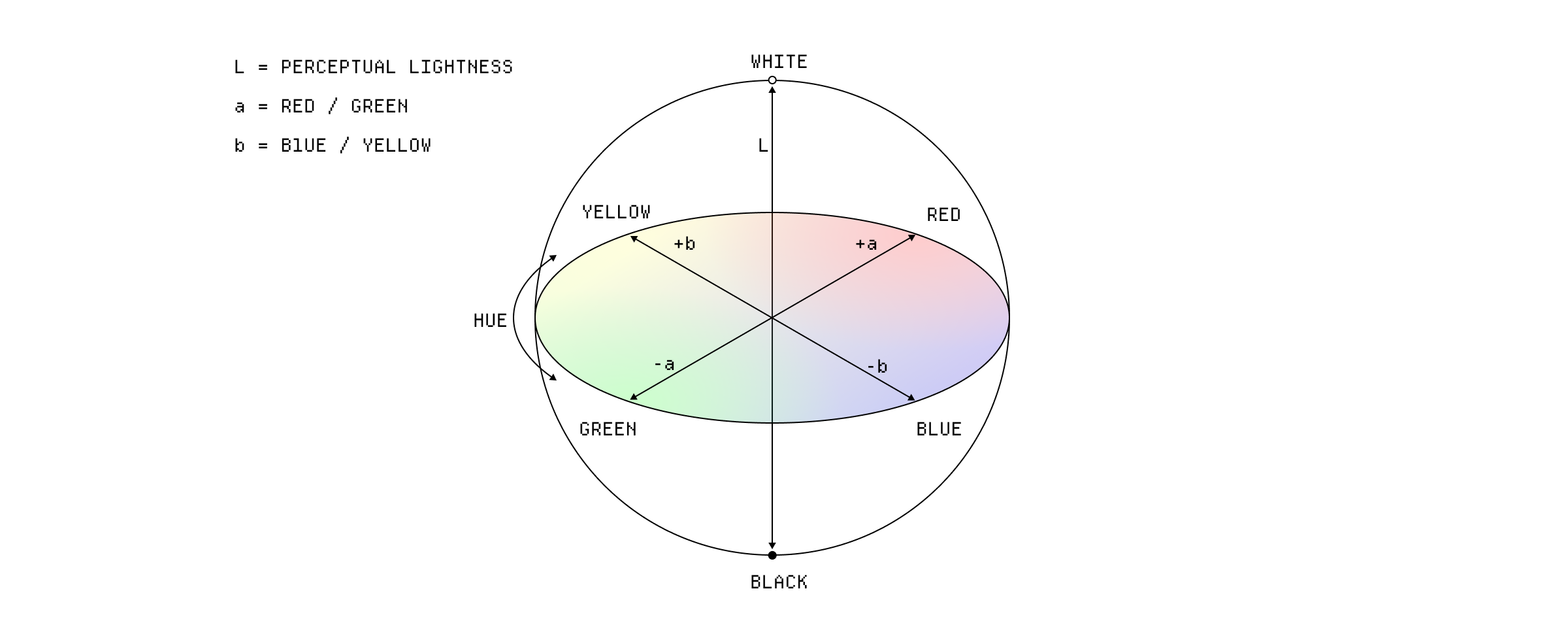
The LAB color model.
These ‘a’ and ‘b’ axes are based on the concept that the human visual system perceives colors in terms of these opposites. You can’t have a greenish-red or a yellowish-blue color. Separating the lightness from the color components, is important too because as I mentioned above, we are more sensitive to changes in lightness than changes in the hue or saturation.
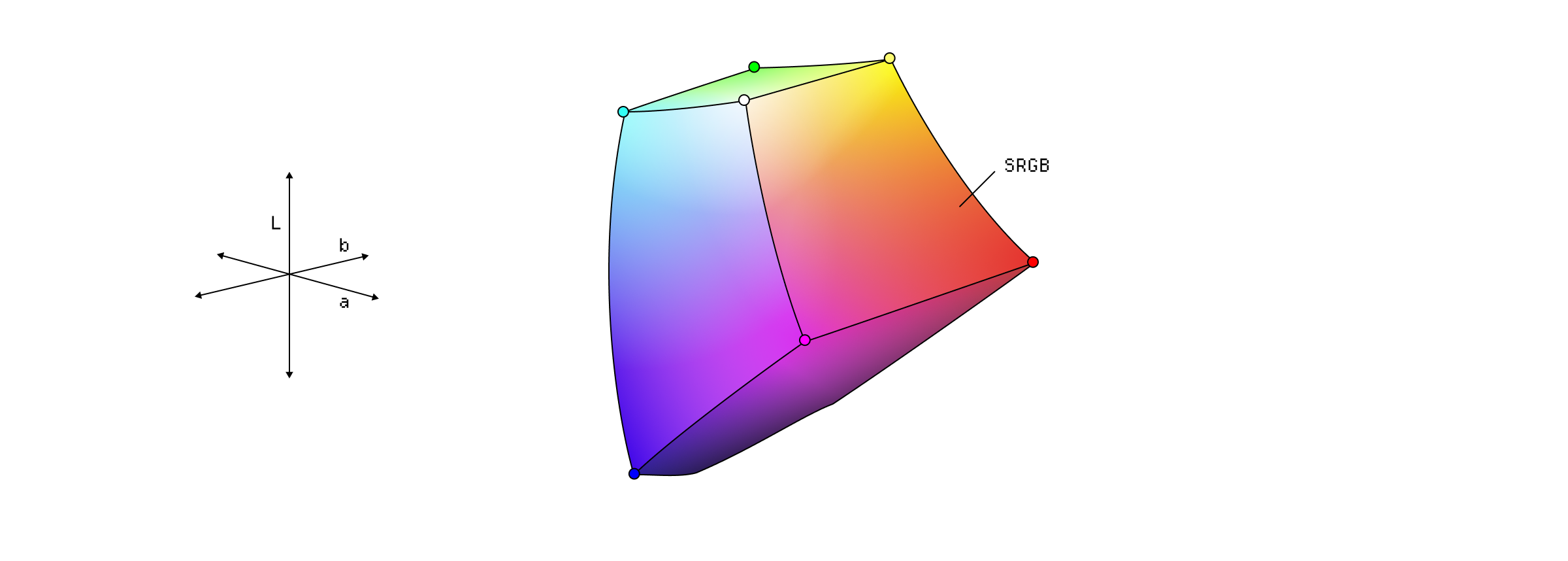
sRGB colors plotted in the LAB color model.
In 2020, Björn Ottosson introduced oklab, and it's related color space oklch, just sort of out of nowhere. Oklab is a modern perceptually uniform color space designed to improve on existing options while also being more straightforward to calculate so that it can be used in real-time applications, which is tricky with some of the old spaces.
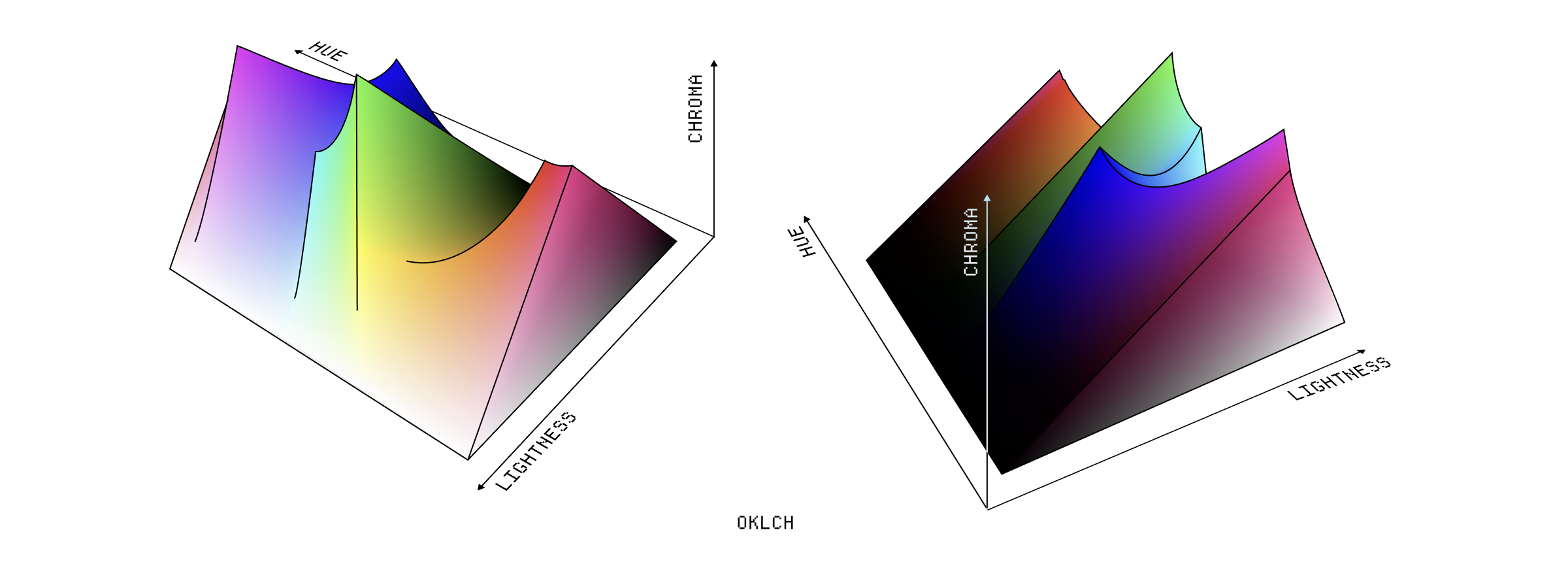
The Oklch color space.
The reason it is this insane shape is that it is manipulating the distances between colors to try compensate for human perception.
Each row here has the same lightness value and you can see how little the lightness varies with different hues, something that most color spaces struggle with:
You can see the effect of this most obviously in gradients, where we are just changing the hue of a color. In perceptually uniform color spaces the differences in lightness are minimal compared to a color space like sRGB.
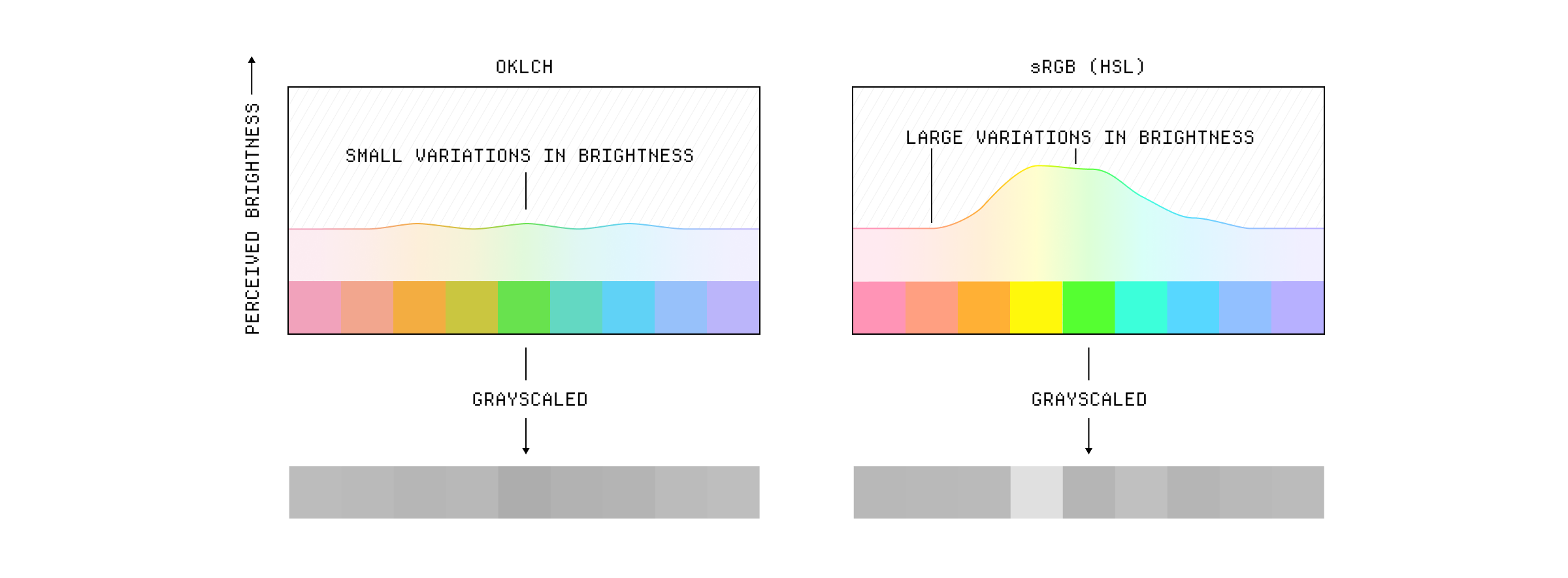
The difference between sRGB and oklch visible in a gradient
Oklch also produces much more pleasing progressions when altering lightness, maintaining saturation in a way that HSL can't.
oklch
sRGB (HSL)
It can be a little tricky to work with though. Because it's a device independant color space, it can be used to represent any color in CIE XYZ color space. But your display doesn't support a lot of those colors, so it's easy to select values that are out of gamut for your display which will be clipped ↓.
The chroma peaks are also relative to the hue and lightness so you can't actually be sure that there will be an equivalent chroma in a different hue. You can see this problem with green, which has the highest chroma. Here's a fairly washed out green where you can see that we can find an equivalent in other hues:
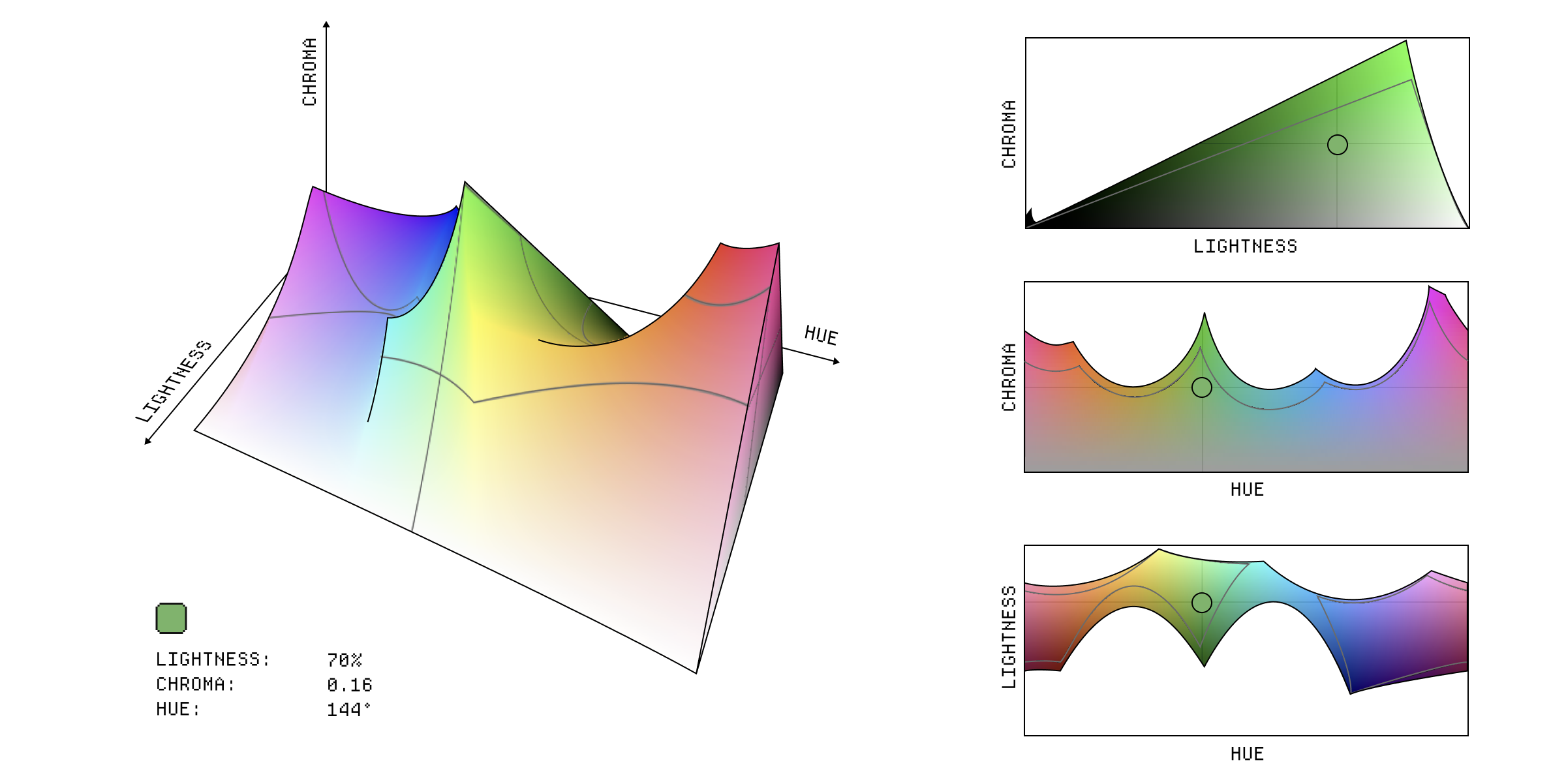
An oklch color picker with a value of 70% 0.16 144.
If we increase the chroma from 0.16 to 0.26, you can see that we have almost no other hues that can match that chroma and lightness combination in the P3 gamut:
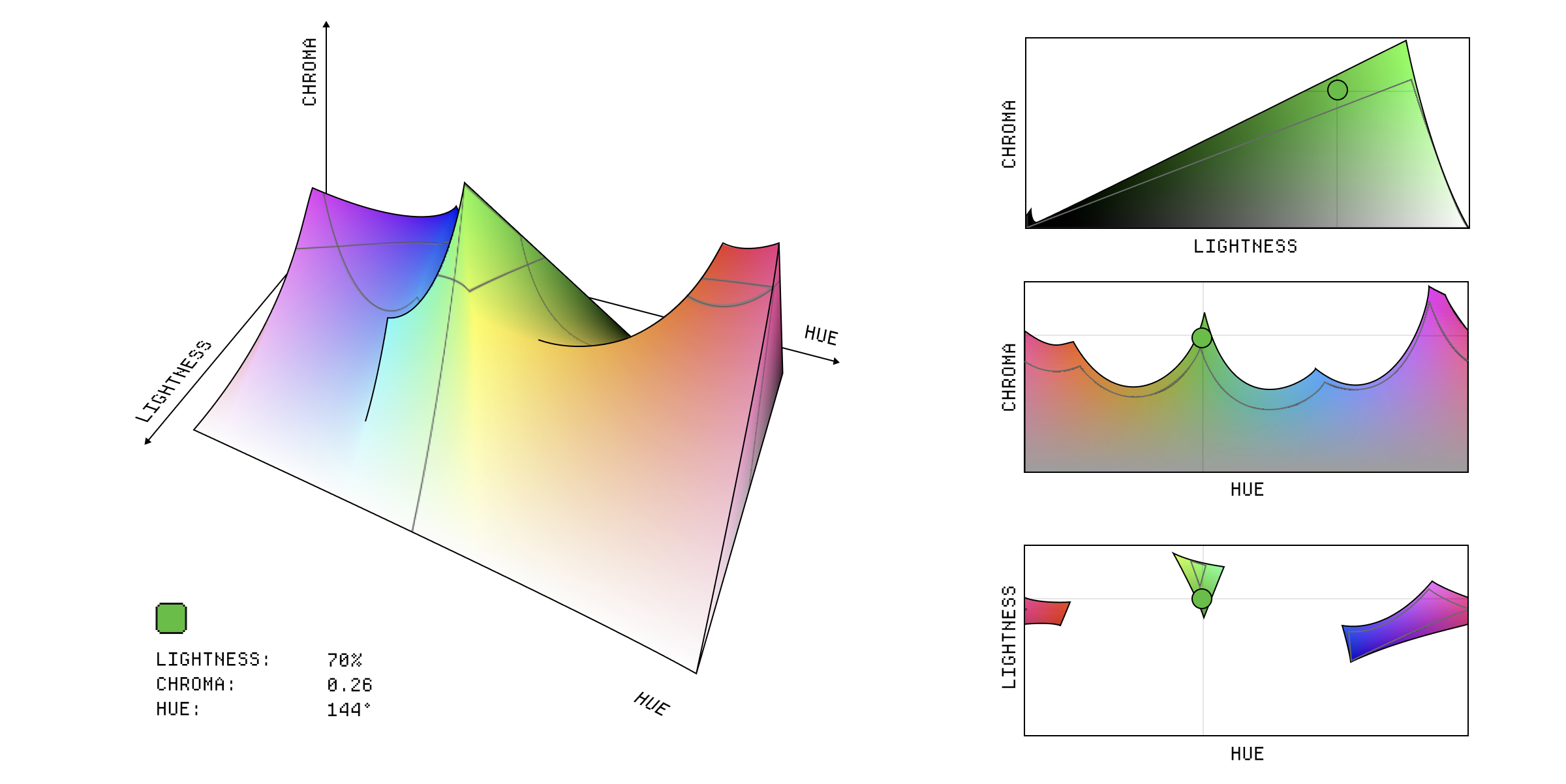
An oklch color picker with a value of 70% 0.26 144.
If you aren't aware of this, you can end up picking colors that are out of gamut without realising it and blaming oklch for looking bad. In reality, you're still at the mercy of your display's gamut.
What happens when you use a color space that has a larger gamut than the device your user is using? Well, you have to try find an equivalent color in the smaller gamut. This is called gamut mapping and it's not as easy as it sounds.
For instance, imagine we are trying to use this green in the Display P3 color space but the user's device only supports sRGB.
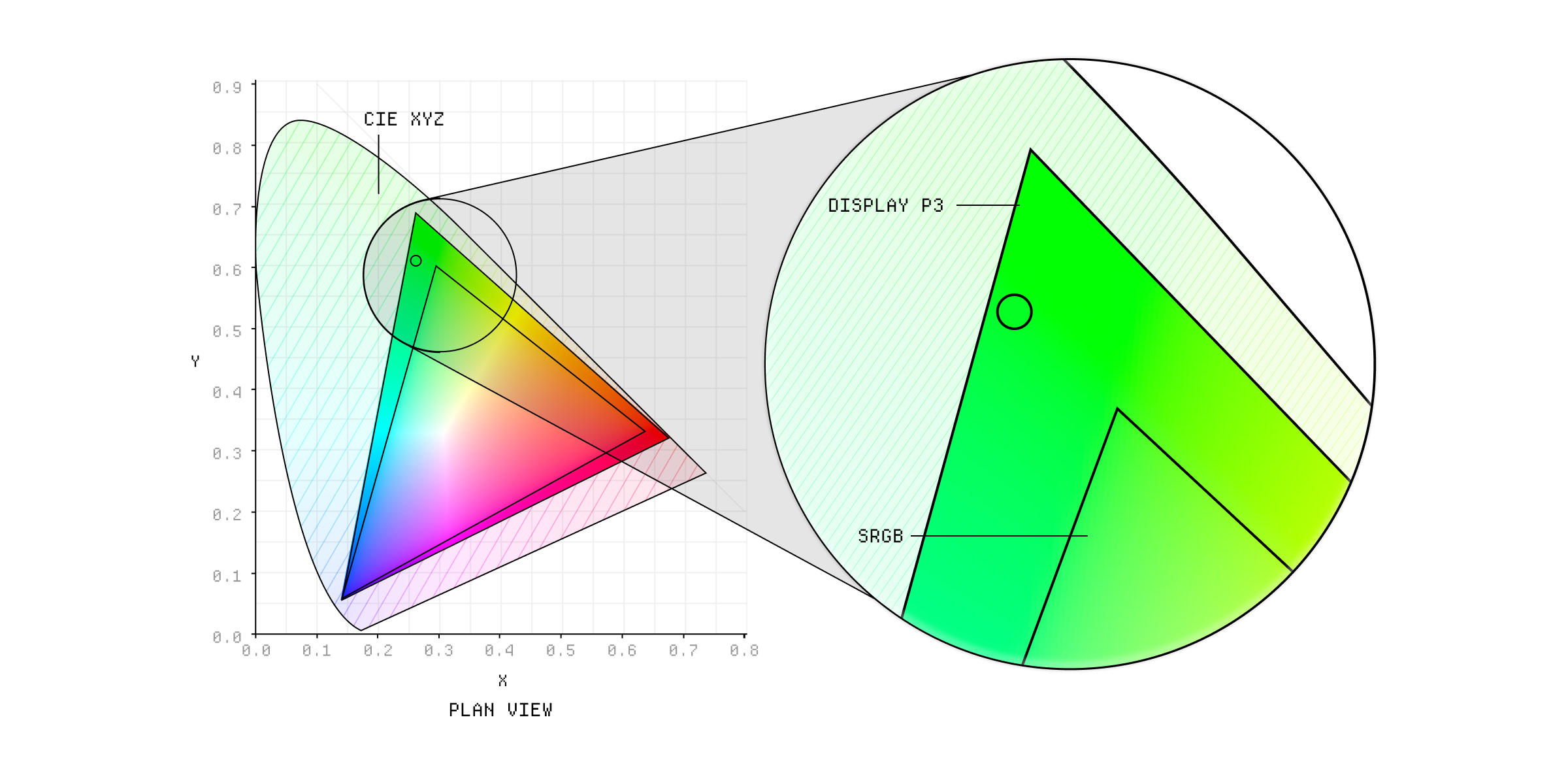
Gamut mapping from Display P3 to sRGB.
The green in Display P3 is both a bit brighter and more saturated than the green in sRGB, so we need to make a decision about how to map it. We could just try find the closest color in the sRGB gamut, which will be less saturated but a similar brightness, or we could try to preserve the saturation and make it a bit darker.
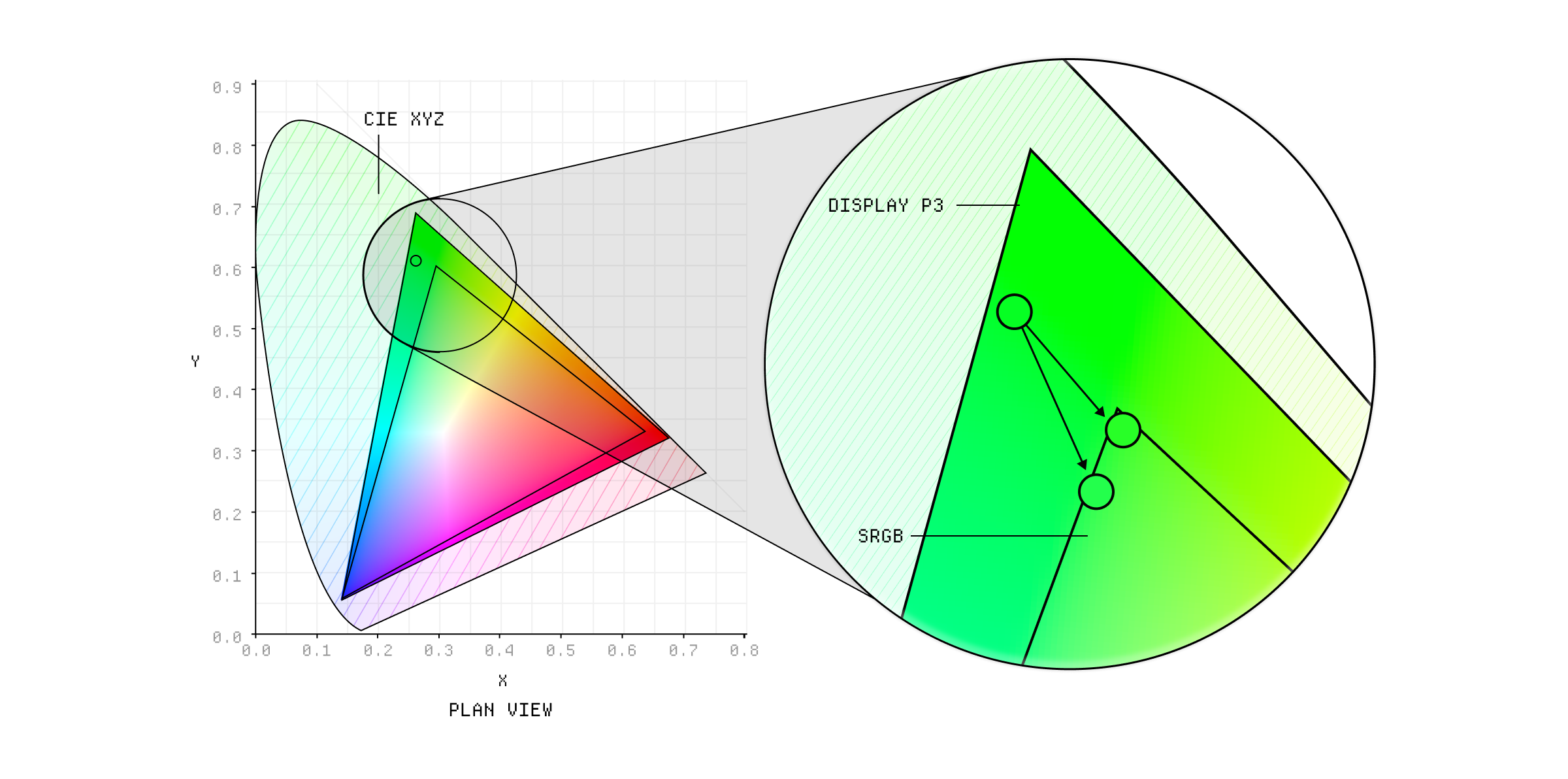
We have to make a compromise when mapping to smaller gamuts.
In practice, trying to preserve the saturation is more expensive and so a lot of software will just clip out of gamut colors to the nearest boundary of the sRGB gamut. This mostly works fine, but results in a loss of detail - you end up with a lot of previously distinct colors that collapse into the same boundary color.
The clipping approach is simple and fast, because it only deals with out of gamut colors, but if you needed to preserve the relationship between colors, you might want to use a compression algorithm that adjusts all colors in the image to fit within the target gamut. This is a lot more expensive, so it's mainly used in high-end applications like professional photo editing software where you don't need to do it in real-time.
A color space usually sets the white point based on the coordinates of white value in one of the CIE reference color spaces. The specific white point you choose, dictates the color temperature for the color space and the choice is made based on the expected viewing conditions for that color space.
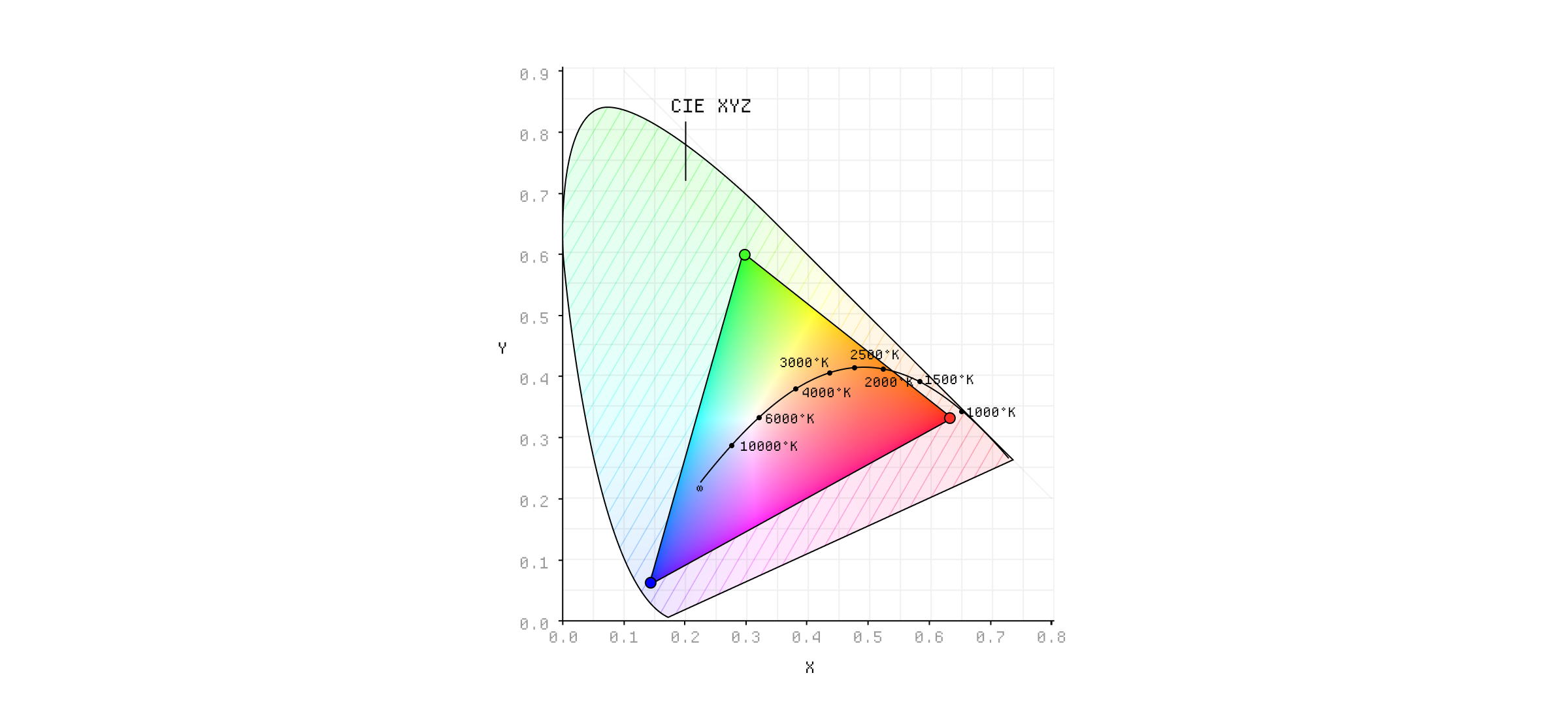
Color temperature plotted against the CIE XYZ color space.
You might use a different white point for a digital color space, usually viewed in a artificially lit room, than a color space designed for cinema which will be viewed in a completely dark environment.
The CIE has actually defined a standard set of white points, called standard illuminants, which are arranged by the quality of white light they mimic:
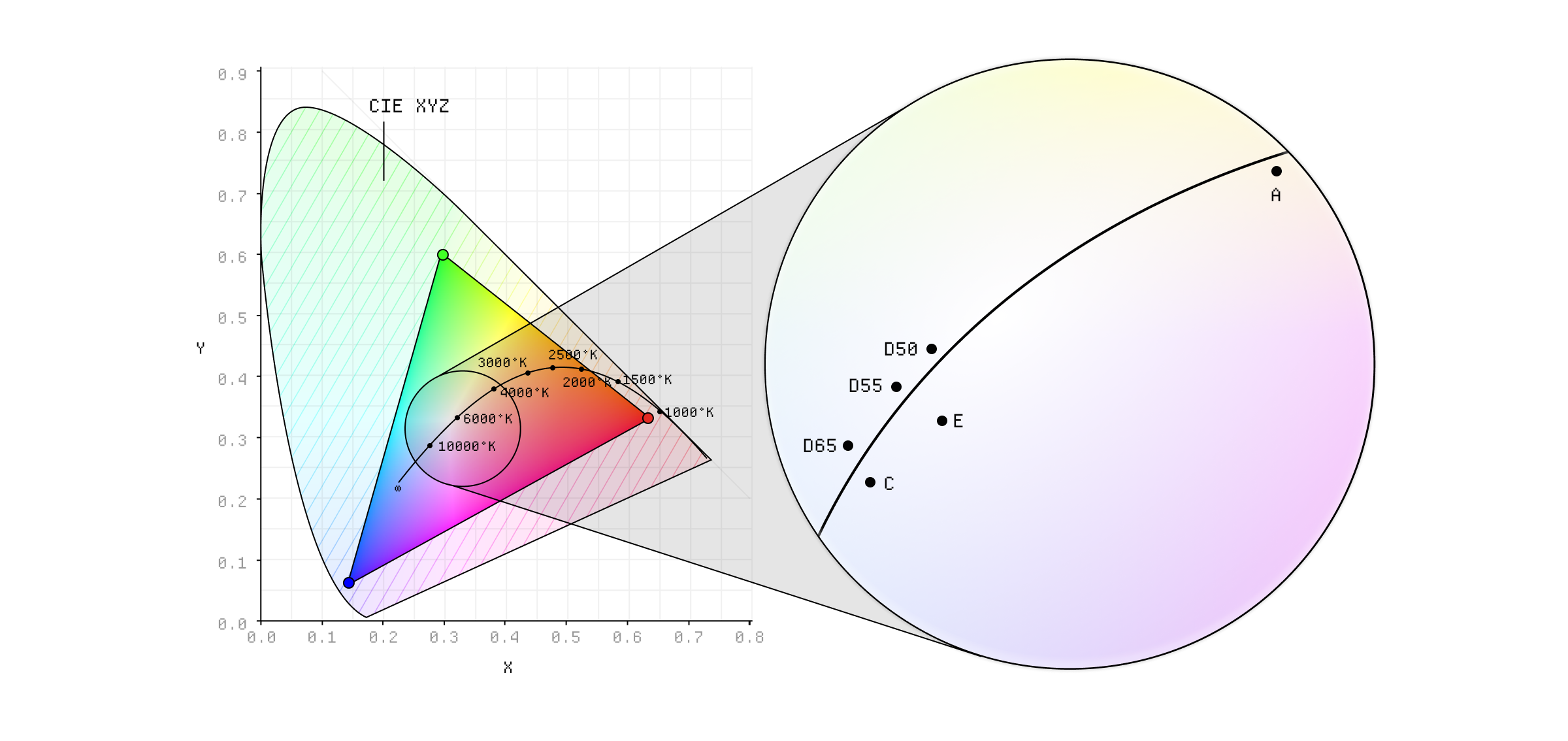
Standard illuminants plotted against the CIE XYZ color space.
- Illuminant A: Equivalent to typical incandescent lighting, with a temperature of 2856 K.
- Illuminant D series: Designed to mimic various phases of natural daylight:
- D50 (5000 K): Represents warmer horizon daylight, like sunrise or sunset. Used as the standard white point for graphics and print.
- D55 (5500 K): Represents cool noon daylight and is used a lot in photography and some print applications.
- D65 (6500 K): Represents average noon daylight and is the most commonly used white point, especially for digital displays. It's the white point used in sRGB, Rec. 709 and 2020 and many others.
- D75 (7500 K): Represents north sky daylight and is used in some higher end display tech to simulate cooler light conditions.
- Illuminant F Series: Mimics various types of fluorescent lamps with different phosphor compositions (e.g., F2 for cool white, F11 for TL84).
- Illuminant E: A theoretical equal-energy pure white light source. Mainly used as a reference point because it's not really achievable in practice.
Because the way we perceive color is so influenced by our surroundings, all of these white points are defined against a standard set of viewing conditions which are actually super boring and so I'll spare you the details of that.
Okay, this is a bit gnarly. You can sort of think of gamma correction as an easing curve we apply to luminance values to stop them from being linear. We first needed this because CRTs had a non-linear response, where the brightness emitted was a power function of the input voltage. So we applied an inverse of the power function to the signal before sending it to the CRT, making the response more linear and preserving the intended luminance.
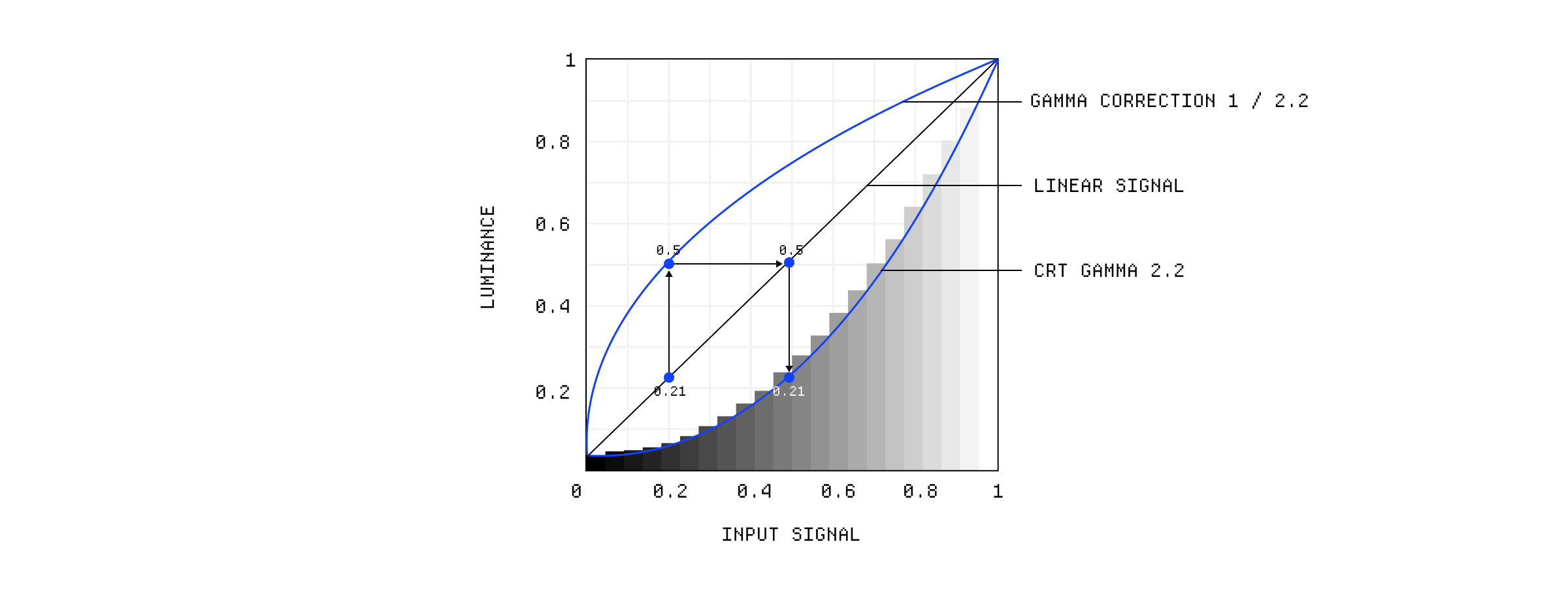
Gamma correction applied to CRT displays.
But we also need it to compensate for the non-linearity of human vision. We are much more sensitive to differences in dark tones than lighter ones. To compensate for this, we apply a compressive curve to the luminance values which allocates more data (in this case, bits) to the darker tonal range, where our eyes are more discerning, and fewer bits to the brighter range.
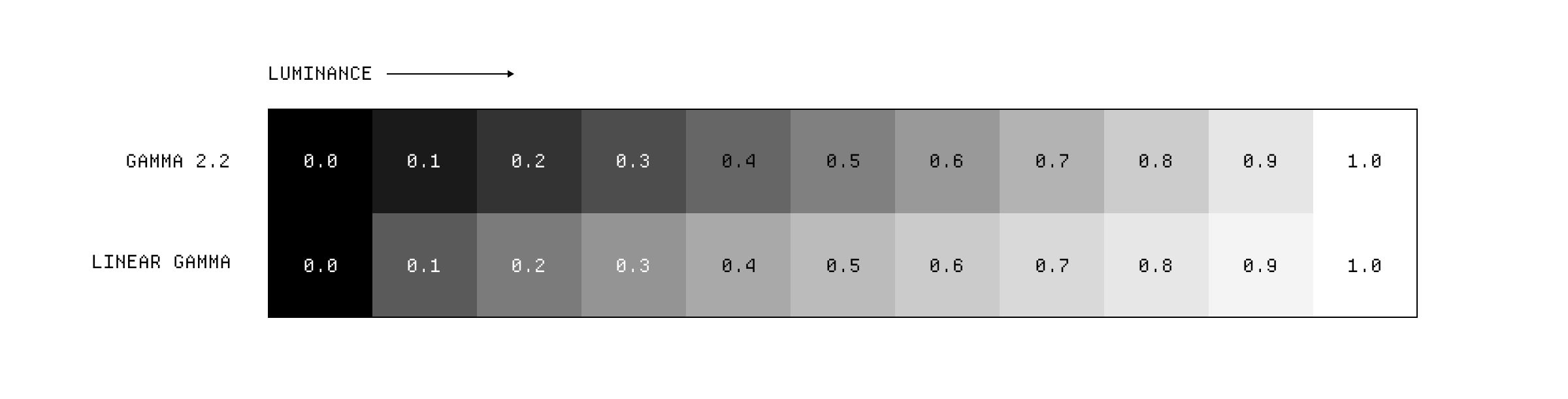
Linear gamma vs gamma 2.2
This allows us to use lower bit depths, like 8-bit per channel, without seeing distinct steps between colors in gradients known as banding. If you wanted to use a linear encoding, you'd need to store more color information per channel, like 12 or 16 bits, to prevent this from happening.
You know those set up screens in video games, where you have to adjust the image until it is only barely visible? Those are adjusting the gamma correction.

Video games allow you to set the gamma correction.
Now, to get very technical, this curve is known as a Tone Response Curve or Transfer Function and gamma value is the average of this curve when plotted on logarithmic axes. We approximate this as a simple power function but in reality these Tone Response Curves can be pretty complex shapes designed to compress dynamic range more gracefully.
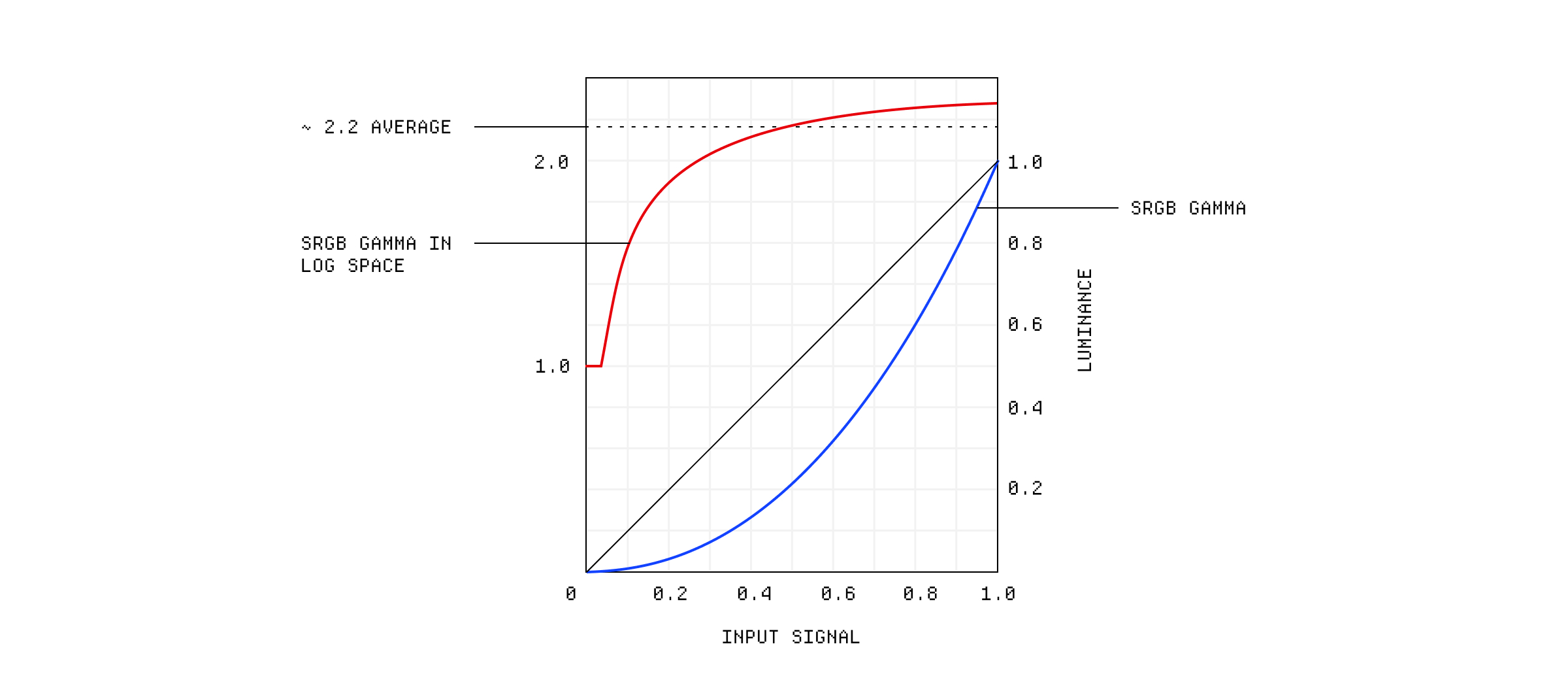
sRGB gamma correction curve in log space.
Luckily, there are some standard gamma values we aim for, even though the underlying response curve might differ:
- Gamma 2.2: The standard display gamma for most computer monitors. It provides a good balance for typical viewing environments and aligns well with perceptual encoding principles.
- Gamma 1.8: Used by older Apple Mac OS versions (pre-OSX 10.6). Produces slightly brighter-looking images compared to gamma 2.2.
- Gamma 2.4: The standard gamma specified for Rec. 709 (HDTV), intended for viewing in dimmer environments than typical computer use.
- Gamma 2.6: Used in the DCI-P3 digital cinema standard, resulting in darker but more saturated-looking images suitable for dark theater environments.
- Linear Gamma (Gamma 1.0): Represents a direct, linear relationship between signal value and light intensity Raw image files typically store data in a linear (or near-linear) form. While computationally convenient for image processing operations, linear encoding is perceptually inefficient for storage and display at lower bit depths.
It all gets a bit more complicated when you consider that we actually tend to process images with linear gamma because it is more computationally convenient. Then when it's time to store or transmit them, we use the encoding gamma which is then decoded by the display gamma. Simple right? Anyway, the idea is that this complicated process is designed to match the way we perceive luminance.
You might have read that the sRGB color space only has 16.7 million colors and think that's just because it's kind of old and has small gamut but that's only half of the story. The amount of discrete colors in any given color space is actually a function of how many bits we use per channel.
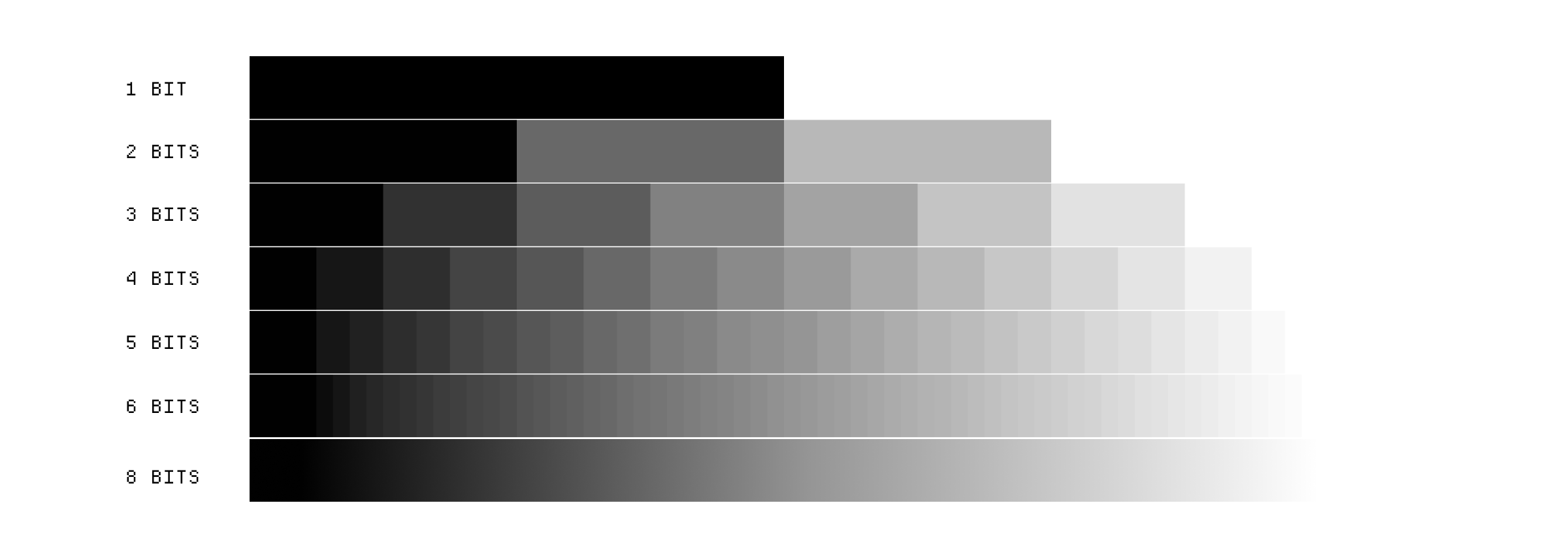
The effect of bit depth in grayscale
In sRGB we typically have 256 possible values per channel, from 0 to 255, which is 8 bits (2^8 = 256) and that means when you calculate the number of combinations of red, green, and blue you get 16.7 million (256^3 = 16,777,216).

8 bit per channel color in binary
You could increase the amount of colors in sRGB without changing the gamut by simply increasing the bit depth. If we had 10 bits per channel, all of a sudden we'd have 1.07 billion possible colors (1024^3 = 1,073,741,824). But you'd need to change the format you specify colors in. Both the rgb(0-255) and hex #RRGGBB formats are constrained to 8 bits per channel.

10 bit per channel color in binary
10 bits per channel is pretty standard these days and it's the minimum required for High Dynamic Range content. High end digital cameras will capture RAW images in 12 bits per channel and image editing software, like Photoshop, will use 16 bits per channel internally to perform complex manipulations while maintaining precision.
Obviously, storing more color information takes up more space, occupies more RAM and requires more processing power so you ideally want to store as little information as you can get away with. This is why the JPEG standard uses 8 bits per channel which often means discarding some color information. We won't go into full detail here, but one method it uses is called Quantization which maps colors from a higher bit depth into a smaller one.
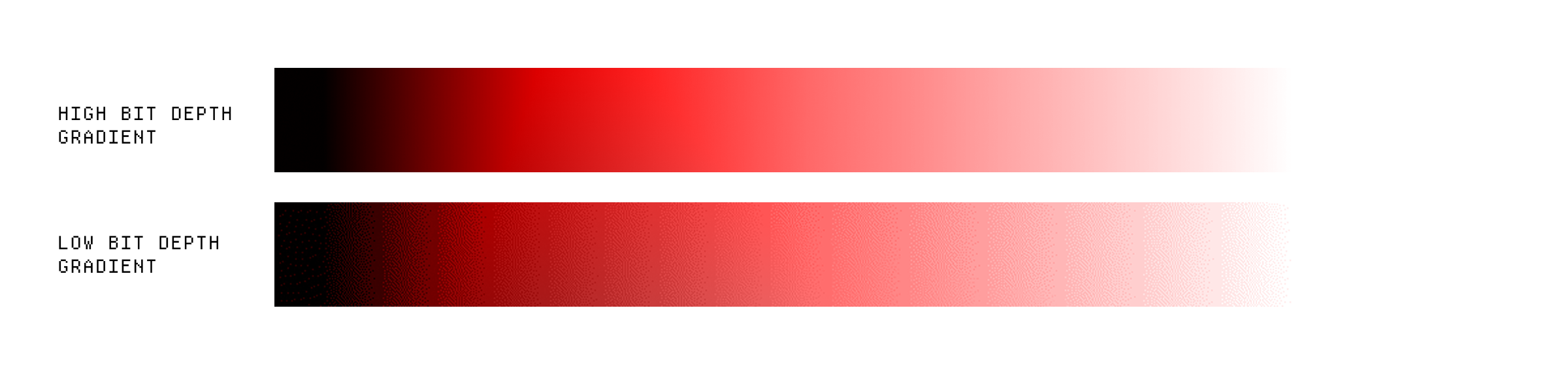
Banding in low bit depth gradients
This can result in some banding, which you'll have seen if you ever export a high bit depth image with a lot of detail from Photoshop. To compensate, we add some dithering to the image which is basically just adding small amounts of noise to make the banding seem less obvious. PNGs don't have this issue as they are lossless and can store up to 16 bits per channel.
Up until this point, we've only been talking about additive color spaces, because we've been dealing with digital color. Almost all digital screens rely on additive color mixing, where colors are created by combining different intensities of red, green, and blue light. This is because screens emit light directly instead of reflecting it, so they can create colors by adding light together.
When you print something, you use subtractive color mixing, where colors are created by subtracting different wavelengths of light from white light. This is because printers use inks or pigments that absorb certain wavelengths of light and reflect others. The most common subtractive color model is CMYK (Cyan, Magenta, Yellow, and Key/Black), which is used in printing.
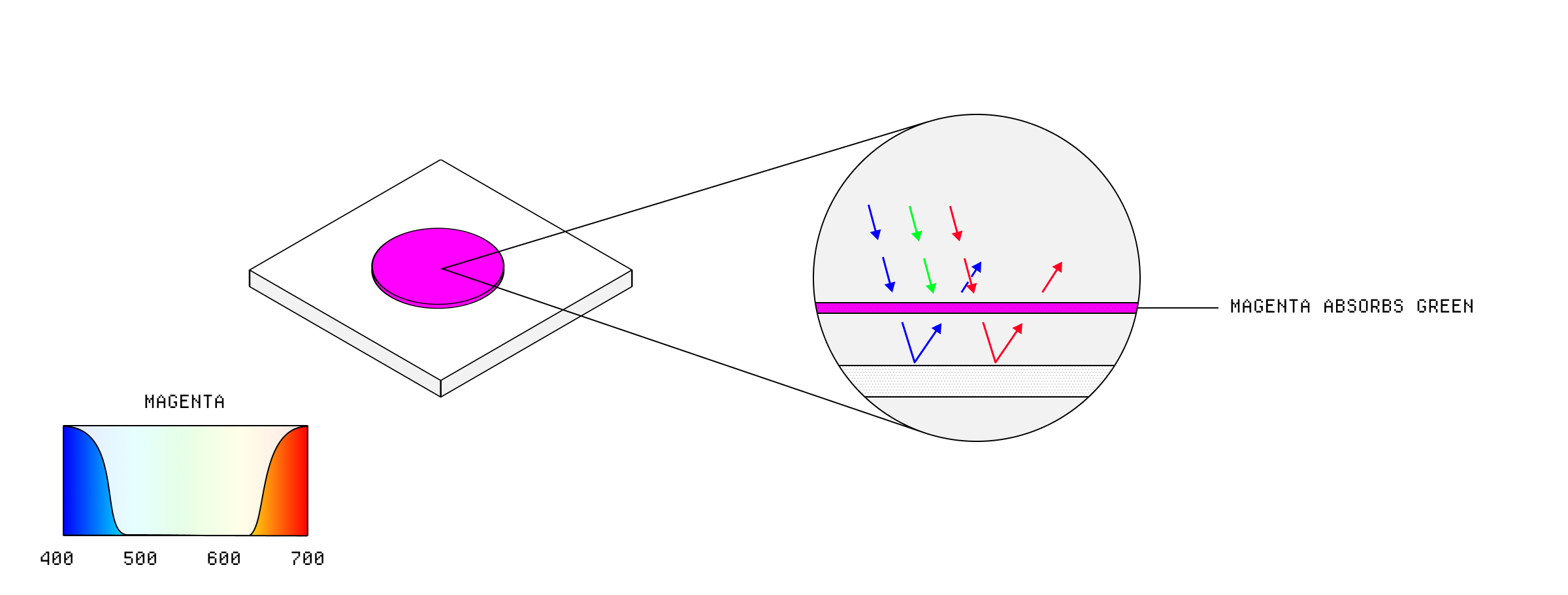
Additive CMYK magenta.
Because you are filtering out colors, you use different primaries than in additive color spaces. In CMYK, the primary colors are cyan, magenta, and yellow, which are the complementary colors to red, green, and blue. In theory, converting from RGB to CMYK is just a matter of finding the complementary colors and adjusting for the white point, but in practice you are at the mercy of the properties of the inks and paper.
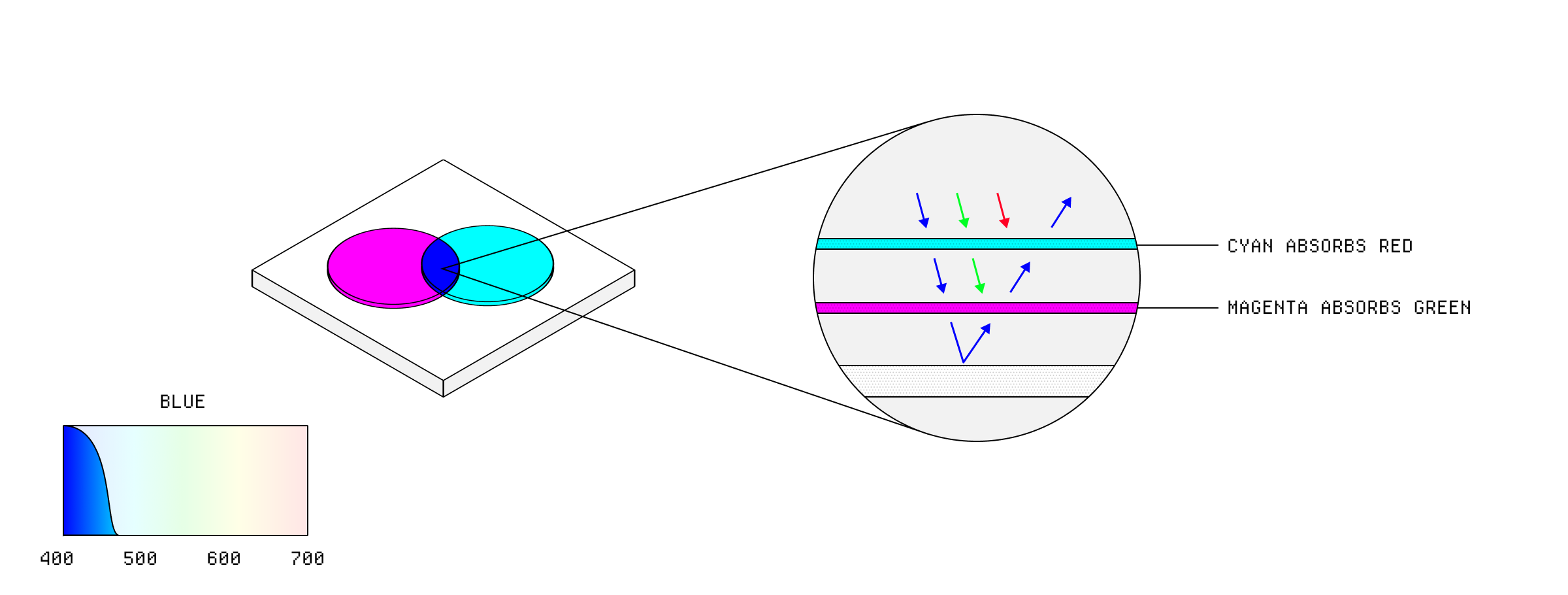
Additive CMYK blue.
There are some digital displays that use subtractive color mixing, like color e-ink displays used in some Kindle type devices. These displays use a combination of colored pigments that can be manipulated to create different colors, but they are still limited by the gamut of the pigments used.
Of course, because color so unreasonably complex, it's not as simple as just picking a color space and then your computer just displays it. There can be different color spaces used at different stages in the display pipeline, and at every stage your computer needs to convert between them.
Your computer has an operating system, which uses a color space. But your computer also runs applications, which might use a different color space. Those apps can render content, like images and videos, which might be in yet another color space. And then your monitor has its own color space, which might not even match the color space of the operating system. You could even have multiple monitors, each with different color spaces. Yep.
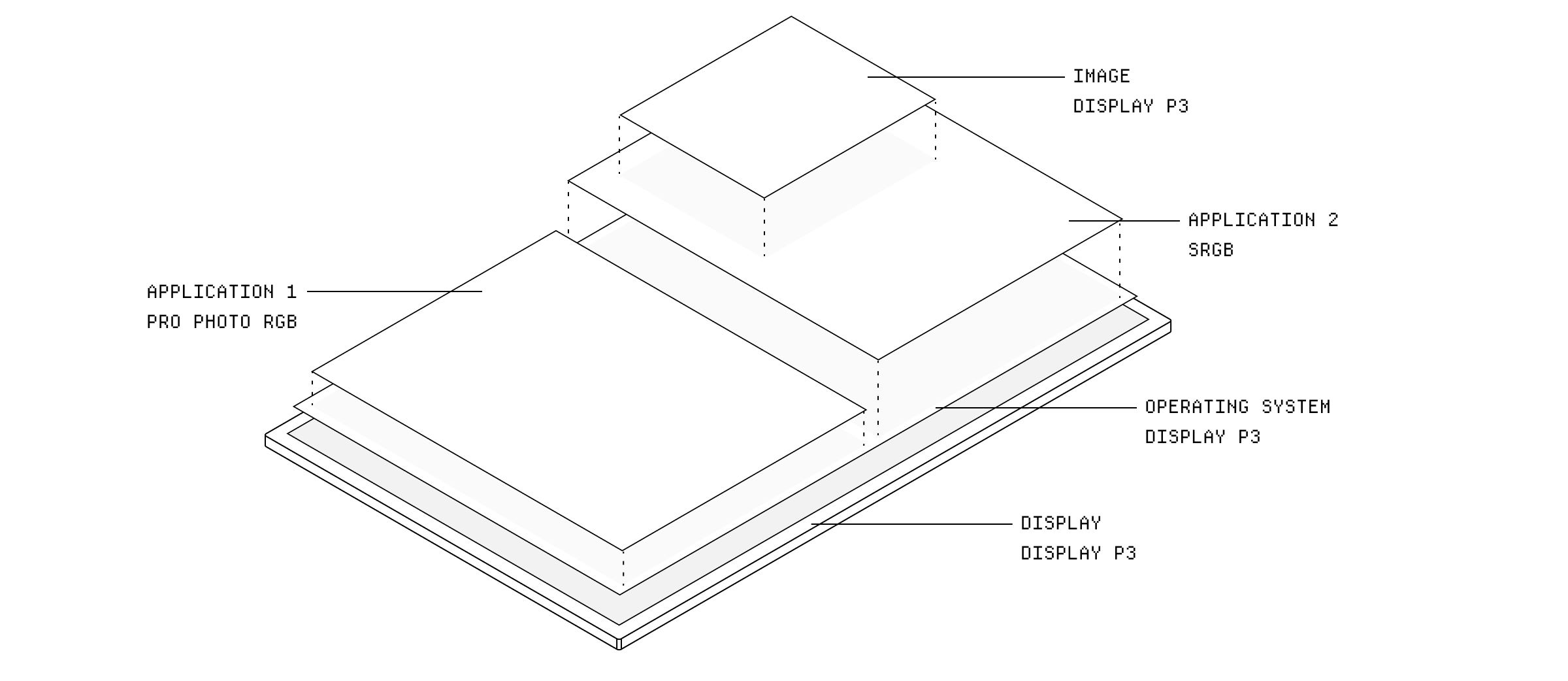
There can be different color spaces at almost any point in the display pipeline.
This is where color management comes in. Color management is the process of ensuring that colors are displayed consistently across different devices and applications. It involves using ICC profiles to describe the color capabilities of each device and application, and then converting colors between different color spaces as needed.
Display P3 color profile data.
When you open an image in an application, the application will read the ICC profile embedded in the image and use that data to convert the colors to the target color space of the OS or display.
This is handled by something called the Color Management Module, which has a whole bunch of algorithms to convert between color spaces in it. The conversion goes through an intermediate device-independant color space, like the CIE XYZ, before being converted to the target color space.
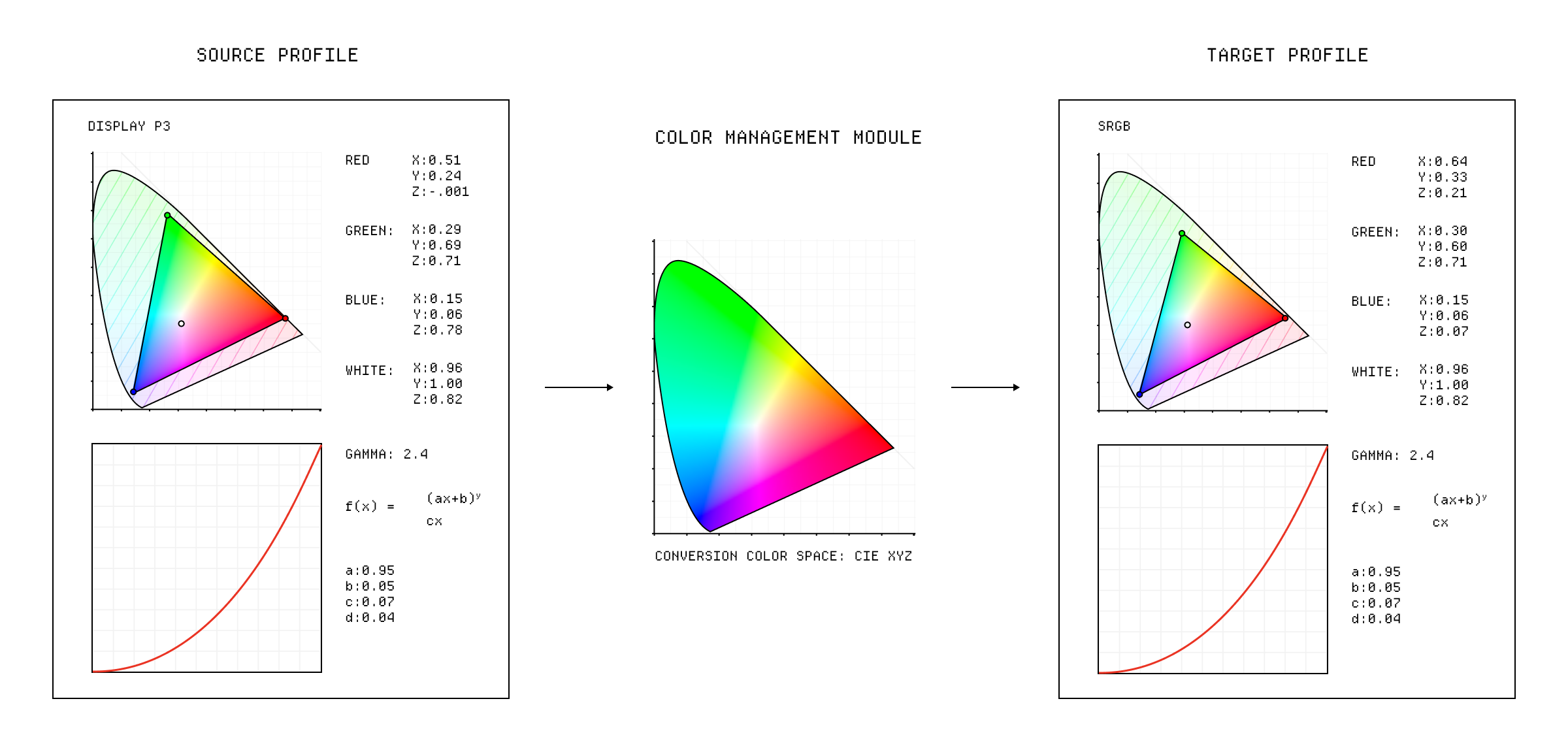
ICC profile conversion.
Your operating system is in charge of coordinating all of this and compositing it together. We don't think about them this way, but our computers are just generating images 60 times a second and sending them to the display. The operating system is responsible for managing the color spaces of all the applications and devices, and converting colors between them as needed.
┌────────────────────────────────┐                              ┌──────────────────────────────────────────────────┐
   │              GPU               │                              │┌┬┬┬┬┬┬┬┬┬┬┬┬┬┬┬┬┬┬┬┬┬┬┬┬┬┬┬┬┬┬┬┬┬┬┬┬┬┬┬┬┬┬┬┬┬┬┬┬┐│
   └────────────────────────────────┘                              │├┼┼┼┼┼┼┼┼┼┼┼┼┼┼┼┼┼┼┼┼┼┼┼┼┼┼┼┼┼┼┼┼┼┼┼┼┼┼┼┼┼┼┼┼┼┼┼┼┤│
   │                │               │                              │├┼┼┼┼┼┼┼┼┼┼┼┼┼┼┼┼┼┼┼┼┼┼┼┼┼┼┼┼┼┼┼┼┼┼┼┼┼┼┼┼┼┼┼┼┼┼┼┼┤│
   │                │               │                              │├┼┼┼┼┼┼┼┼┼┼┼┼┼┼┼┼┼┼┼┼┼┼┼┼┼┼┼┼┼┼┼┼┼┼┼┼┼┼┼┼┼┼┼┼┼┼┼┼┤│
   ▼                ▼               ▼      ┌────────────────┐      │├┼┼┼┼┼┼┼┼┼┼┼┼┼┼┼┼┼┼┼┼┼┼┼┼┼┼┼┼┼┼┼┼┼┼┼┼┼┼┼┼┼┼┼┼┼┼┼┼┤│
   ┌────────────────────────────────┐      │                │      │├┼┼┼┼┼┼┼┼┼┼┼┼┼┼┼┼┼┼┼┼┼┼┼┼┼┼┼┼┼┼┼┼┼┼┼┼┼┼┼┼┼┼┼┼┼┼┼┼┤│
   │01010101010101010101010101010101│      │    DISPLAY     │      │├┼┼┼┼┼┼┼┼┼┼┼┼┼┼┼┼┼┼┼┼┼┼┼┼┼┼┼┼┼┼┼┼┼┼┼┼┼┼┼┼┼┼┼┼┼┼┼┼┤│
┌──┼─────────────────────────────┐────────►│   CONTROLLER   │──────►├┼┼┼┼┼┼┼┼┼┼┼┼┼┼┼┼┼┼┼┼┼┼┼┼┼┼┼┼┼┼┼┼┼┼┼┼┼┼┼┼┼┼┼┼┼┼┼┼┤│
│10101010101010101010101010101010│01│      │                │      │├┼┼┼┼┼┼┼┼┼┼┼┼┼┼┼┼┼┼┼┼┼┼┼┼┼┼┼┼┼┼┼┼┼┼┼┼┼┼┼┼┼┼┼┼┼┼┼┼┤│
│10101010101010101010101010101010│10│      └────────────────┘      │├┼┼┼┼┼┼┼┼┼┼┼┼┼┼┼┼┼┼┼┼┼┼┼┼┼┼┼┼┼┼┼┼┼┼┼┼┼┼┼┼┼┼┼┼┼┼┼┼┤│
│10101010101010101010101010101010│10│                              │├┼┼┼┼┼┼┼┼┼┼┼┼┼┼┼┼┼┼┼┼┼┼┼┼┼┼┼┼┼┼┼┼┼┼┼┼┼┼┼┼┼┼┼┼┼┼┼┼┤│
│10010101010101010101010101010101│01│                              │├┼┼┼┼┼┼┼┼┼┼┼┼┼┼┼┼┼┼┼┼┼┼┼┼┼┼┼┼┼┼┼┼┼┼┼┼┼┼┼┼┼┼┼┼┼┼┼┼┤│
│01010101010101010101010101010101│01│                              │├┼┼┼┼┼┼┼┼┼┼┼┼┼┼┼┼┼┼┼┼┼┼┼┼┼┼┼┼┼┼┼┼┼┼┼┼┼┼┼┼┼┼┼┼┼┼┼┼┤│
│01010101010010101010101010101010│01│                              │├┼┼┼┼┼┼┼┼┼┼┼┼┼┼┼┼┼┼┼┼┼┼┼┼┼┼┼┼┼┼┼┼┼┼┼┼┼┼┼┼┼┼┼┼┼┼┼┼┤│
│10101010101010101010101010101010│01│                              │└┴┴┴┴┴┴┴┴┴┴┴┴┴┴┴┴┴┴┴┴┴┴┴┴┴┴┴┴┴┴┴┴┴┴┴┴┴┴┴┴┴┴┴┴┴┴┴┴┘│
│10101010101010101010101010101010│01│                              └────────────────────  DISPLAY  ───────────────────┘
│10101010101010101010101010101010┼──┘
│10101010101010101010101010101010│
└───────  FRAME BUFFER   ────────┘
Ultimately, though, it's the color space of the display that is the limiting factor. If you are editing an image in a wide gamut color space, like ProPhoto RGB, but your monitor only supports Display P3, you won't be able to see the full range of colors in the image and you won't even know.
So we've defined a lot of confusing color terms already but there are a few more that are used interchangeably that actually have different meanings.
When we describe how bright a color is, we might use different terms depending on the context:
- Luminance: A physical measurement of the amount of light emitted or reflected by a surface, usually measured in candelas per square meter (cd/m²). It's a component of the CIE XYZ color space and is used to describe the brightness of a color in a device-independent way.
- Brightness: A perceptual measurement of how bright a color appears to the human eye, which can be influenced by factors like hue, surrounding colors and lighting conditions.
- Lightness: A perceptual measurement of how light or dark a color appears to the human eye, relative to the reference white of the color space. It's often used in color models like HSL (Hue, Saturation, Lightness) or L a b* (where L* represents lightness).
- Value: A measurement of brightness relative to the maximum brightness for that color, often used in the HSV (Hue, Saturation, Value) color model. Differs from lightness in that it is not relative to a reference white but rather to the maximum brightness of the color itself. Confusingly, it is also sometimes used interchangeably with brightness, but in the context of HSV it refers to the maximum brightness of the color.
You can see the difference between lightness and value if you consider the different shapes of these color models. In HSL, the entire top of the cylinder is white, so the lightness is relative to that white point. In HSV, the top of the cone is the maximum brightness for that color, so the value is relative to that maximum brightness.
When we describe the vibrance of a color, we might use different terms as well:
- Chromaticity: This is a two-dimensional representation of color that describes the hue and saturation of a color, without considering its brightness. It's often represented as coordinates in a chromaticity diagram, like the CIE 1931 chromaticity diagram.
- Chroma: A measure of the colorfulness of a color, which is independent of its brightness, relative to the reference white of the color space.
- Saturation: A measure of the colorfulness of a color, which is independent of its brightness, relative to the the maximum colorfulness of the color.
Confusingly, saturation isn't used strictly correctly in the HSL or HSV color models, because they are transforms of RGB, which doesn't have chroma or saturation as separate components. In practice, this doesn't matter too much and you can just think of saturation as a measure of how pure a color is in that context.
╌╌╌╌
So what have we learned? Digital color is a hot, complicated mess of different color spaces, models, and management systems that all work together to try make sure that the color that gets to your eyeball is somewhat close to what was intended.
But the cool thing about color is that none of that really matters. You can care about it as much, or as little, as you want. It's not like you could pick a color that a user won't see - software is there not make sure that they always see something. Just pick colors that are legible and look good to you and trust that the software will take care of the rest.
╌╌ END ╌╌